PlainStaff Changelog

2026-08-24
v6.3.1
PRODUCT UPDATE  ·  VERSION 6.3.1
The e-invoicing obligation
is coming. You're covered.
XRechnung, ZUGFeRD, Peppol BIS and Factur-X – created, validated and archived straight from your project billing.
Available from August 31, 2026
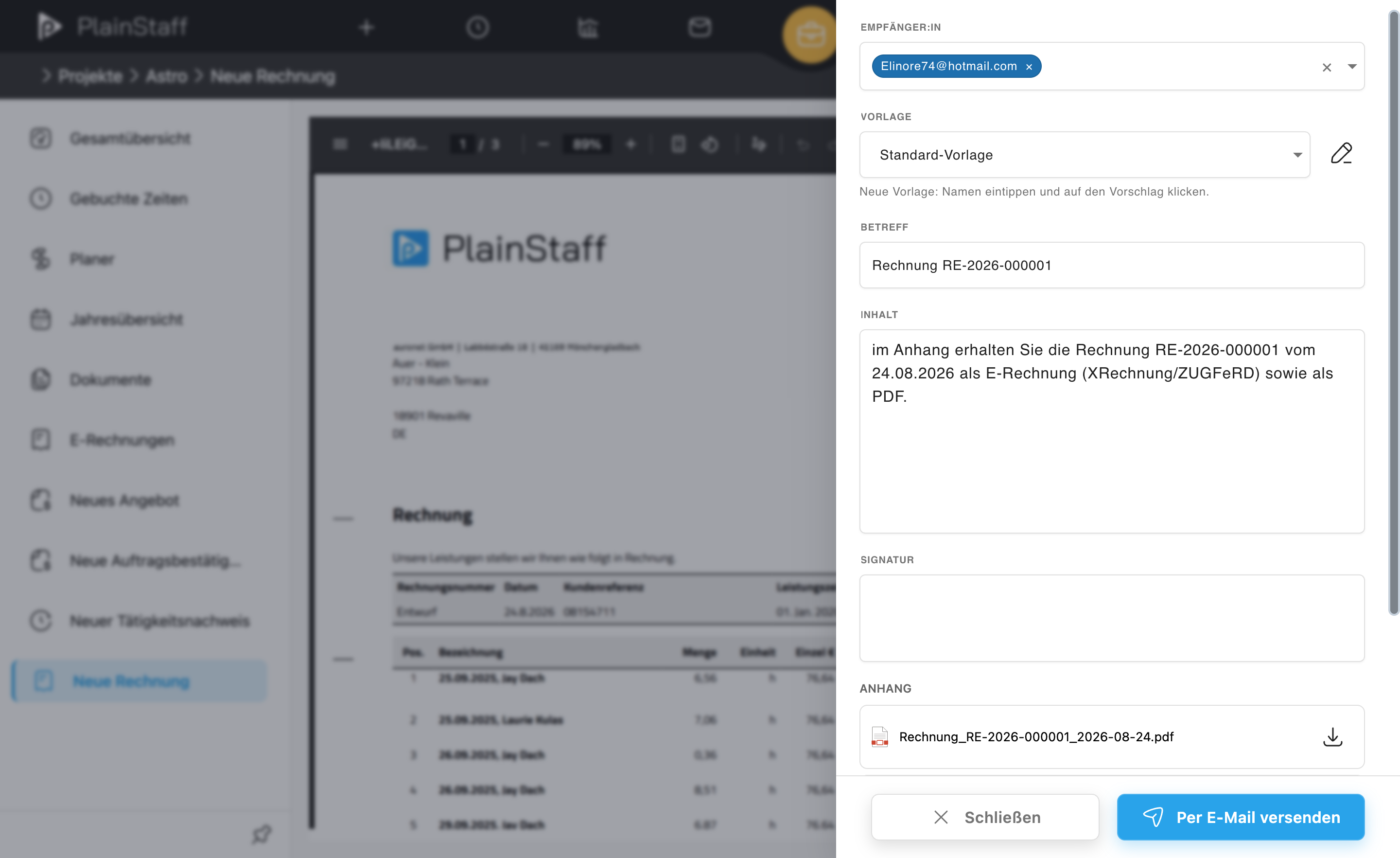
Creating an invoice in PlainStaff
Create an invoice – straight from project billing, in your customer's format.
WHY NOW
Receive from 2025, issue from 2027
Businesses already have to be able to receive e-invoices in B2B, and from 2027 they must issue them fully digitally. Invoices to public authorities require XRechnung today.
  E-invoicing in PlainStaff is available from August 31, 2026 – on every plan, with the formats of your own country.
NEW IN PLAINSTAFF
From time entry to a validated e-invoice
Create e-invoices directly from your project billing – no detour, no second tool.
1
Your country's formats – on every plan
XRechnung (XML) for authorities, ZUGFeRD (hybrid PDF) for business customers.
2
Validation before issuing
Checked against the official rules of the selected format – errors are explained in plain language, with the Leitweg-ID stored per customer.
3
A complete invoice archive
PDF/XML download, resending, cancellation with credit note, payment status and dunning.

CUSTOMERS ABROAD
One format per customer
XRechnung is meaningless outside Germany – Belgium runs on Peppol, France on Factur-X. Storing a different format per customer works on every plan; without Gold you pick from the formats of your own country.
If your company is not based in Germany, you get the format required there even without Gold.
 
GOLD PLAN
 
Every foreign format, freely selectable.
Peppol BIS Billing 3.0, Factur-X 1.07 and the neutral EN 16931 profiles (CII & UBL) become available for every customer – so you can bill each one in the format of their country.
So you never send the wrong format
Country guidance in the customer master: customary format, required channel, source and review date.
Preflight dialog before issuing: it names the profile in use and where it came from.
A format-true archive: the credit note for an XRechnung stays an XRechnung.
Straight talk about delivery: PlainStaff creates the document and sends it by email. Where a country additionally prescribes a channel – the Peppol network, SdI, Chorus Pro or the German ZRE and OZG-RE portals – you upload the finished file there or hand it to your e-invoicing provider. The guidance in the customer master tells you upfront where this applies.
Getting started
Three steps to your first e-invoice.
We hope the new features make your daily work noticeably easier!
If you have any questions or feedback, feel free to contact us: [email protected]

Best regards
Your PlainStaff Team
2026-06-22
v6.3.0

What's New in PlainStaff

Hello!

We hope you're doing well! Over the past months, we have been working intensively on PlainStaff and are excited to present our biggest update yet: Version 6.3.0. It will be available at 29.06.2026.

This release brings noticeably more speed, significantly improved security, and a much more pleasant user experience to your daily work. Whether it's time tracking, project management, or month-end closing – PlainStaff reduces clicks, speeds up processes, and keeps you in full control.

Noticeably Faster

The entire application has been fundamentally optimized in the background. Especially when working with many employees, projects, or bookings, PlainStaff now loads significantly faster. Even on high-traffic days such as month-end, performance remains pleasantly smooth.

Even More Secure for Your Data

Protecting your company and employee data is our top priority. In this version, we have further expanded security in several areas:

  • More robust login process with reliable handling of expired sessions
  • Significantly improved Single-Sign-On (SSO) for smooth login via corporate access
  • Additional protection against automated attacks and bots
Full Control Over Your Subscription

From now on, you manage your subscription completely yourself – securely, transparently, and without contacting support. On the new subscription page, you can view your current plan at any time and upgrade, adjust, or cancel with just a few clicks. Payments are processed via Stripe. Available for Bronze, Silver, and Gold customers.

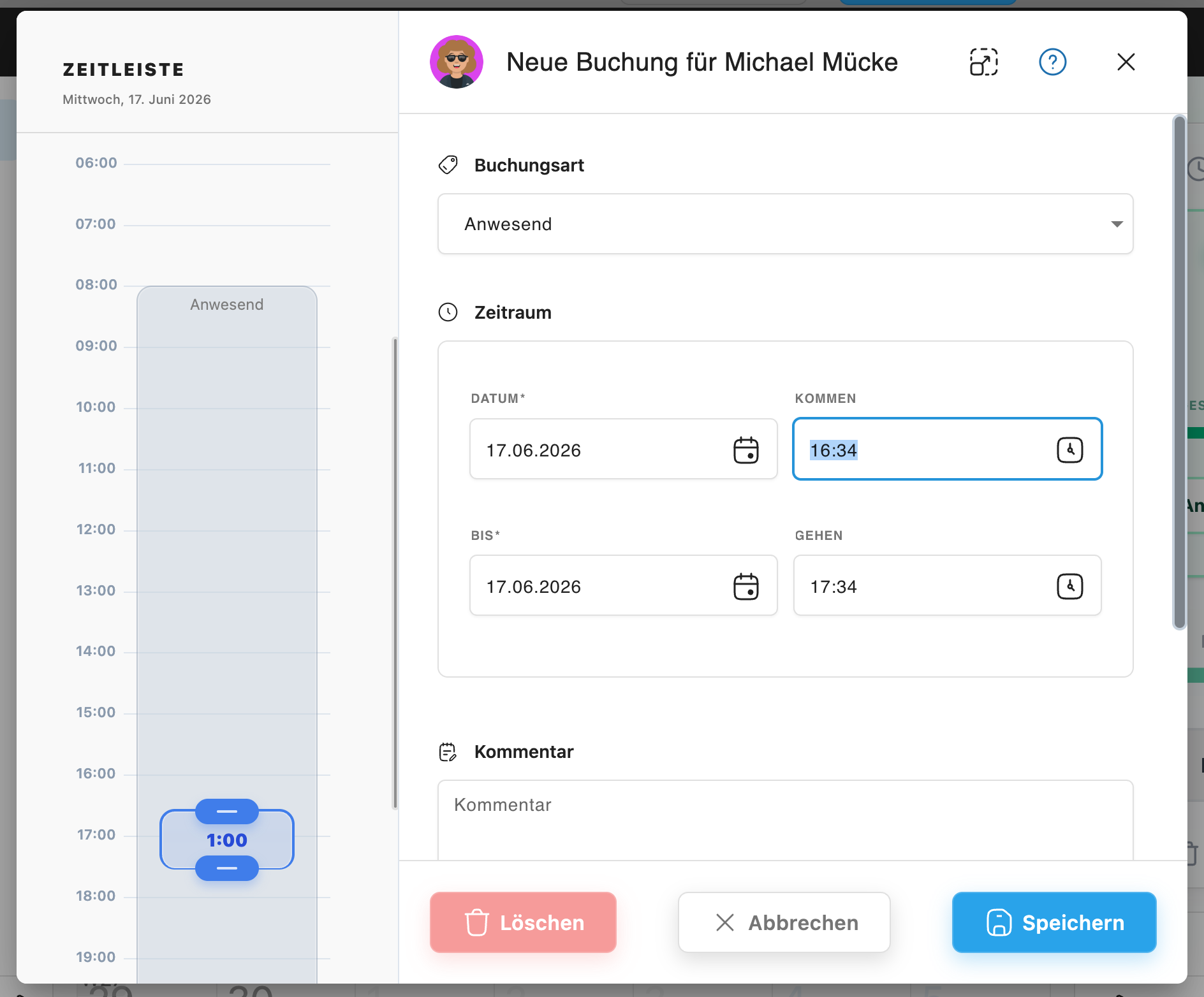
Faster time tracking – with completely new booking dialogs
Fresh Team Calendar
  • Modern, clean design for better overview of absences, appointments, and workload
  • Significantly faster and more intuitive navigation between months
  • Reliable display of all appointments
  • Attractive highlighting of team birthdays
Better Project Overview
  • New project dashboard with all key metrics and statistics at a glance
  • Revised booking overview with clearer layout
  • Hide zero bookings in time sheets and invoices for clearer evaluations
Clock in with One Click

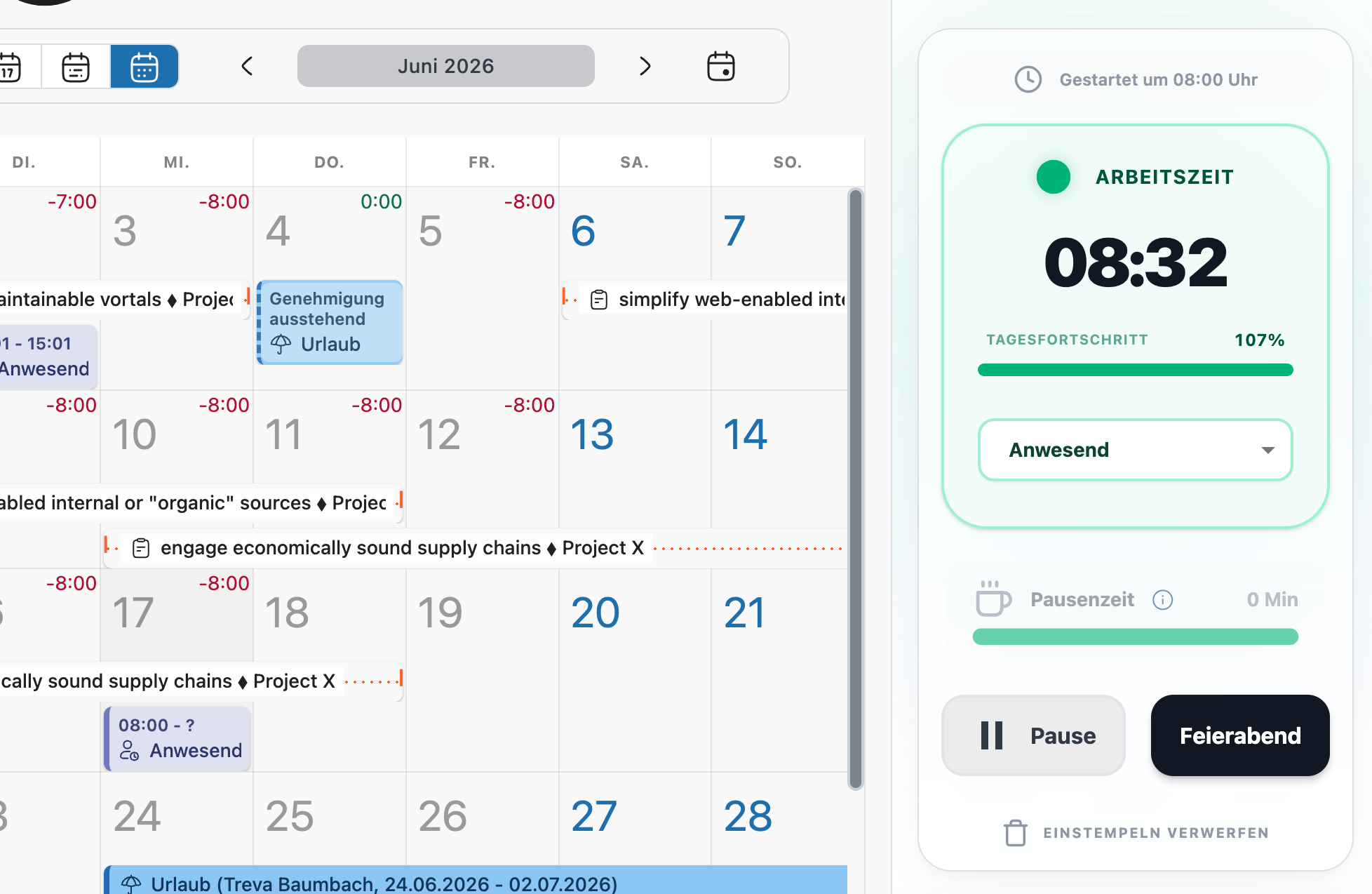
With the new punch card in the top right of the home page, you and your team record working hours, breaks, and project times with just one click. Selecting the right task or project is now even faster.

The new punch card – lightning-fast time tracking
Complete Traceability

The new Audit Log records every change and ensures PlainStaff is audit-proof:

Month-End Closing Made Easy
  • Flexible, manually triggered closing process
  • New fully automatic month-end closing
  • Closed periods are securely frozen
  • Optional automatic capping of time account balances
  • Automatic creation and filing of account statements
  • You can find all these settings in the basic settings in the admin area: https://app.plainstaff.com/-/admin/settings
Better Reports & Exports
  • Time account PDF: Cleaner layout with direct display of corrections in the table
  • GoBD-compliant export: New export in audit-proof IDEA format – ideal for tax authorities or tax advisors
  • Pro-rated metrics: Remaining leave and vacation entitlement now also pro-rated by tenure (optionally displayable)
A More Modern PlainStaff
  • Uniform dialogs with clear toolbar and footer
  • Refreshed, modern, and more pleasant design
  • Custom number and date formats independent of language
  • Small moments of success with confetti cannons at appropriate places
Current Public Holidays Worldwide

Updated holiday rules for Australia, Canada, USA, New Zealand and minor corrections for Germany.

Easier Employee Management
  • New clear employee dialog with clear tabs
  • Improved and more robust invitation of new employees

We hope the new features will make your daily work noticeably easier!

If you have any questions or feedback, feel free to contact us:

[email protected]

Best regards

Your PlainStaff Team

2026-01-07
v6.2.0

News at PlainStaff

Hello everyone,

We hope you are doing well! We have been working hard on PlainStaff again and are pleased to present the update to version 6.2.0 today. In addition to several practical new features, we’ve also made under-the-hood improvements to make the application even faster and more user-friendly for you.

General Features & Reports

In the general administration area, there are helpful extensions for reports and billing:

  • Filter for inactive employees: In the employee overview, there is now a new filter option that allows you to specifically filter for inactive employees or display only active employees.
  • Improved Reports:
    • You can now set a custom time interval for all reports.
    • With the double-arrow button in the report list, you can easily have an existing report recreated.
    • A new Payslip report is available, allowing for quick and easy payroll processing.
    • The time tracking report now also includes target hours for better comparison.
    • Corrections (vacation and time accounts) and additional KPIs have been added to the employee master data report.
  • Mass Invoicing: With the new "Send and Next" button, you can create an invoice in no time and automatically jump to the next project with billable hours. This saves a lot of time and makes invoicing even easier.
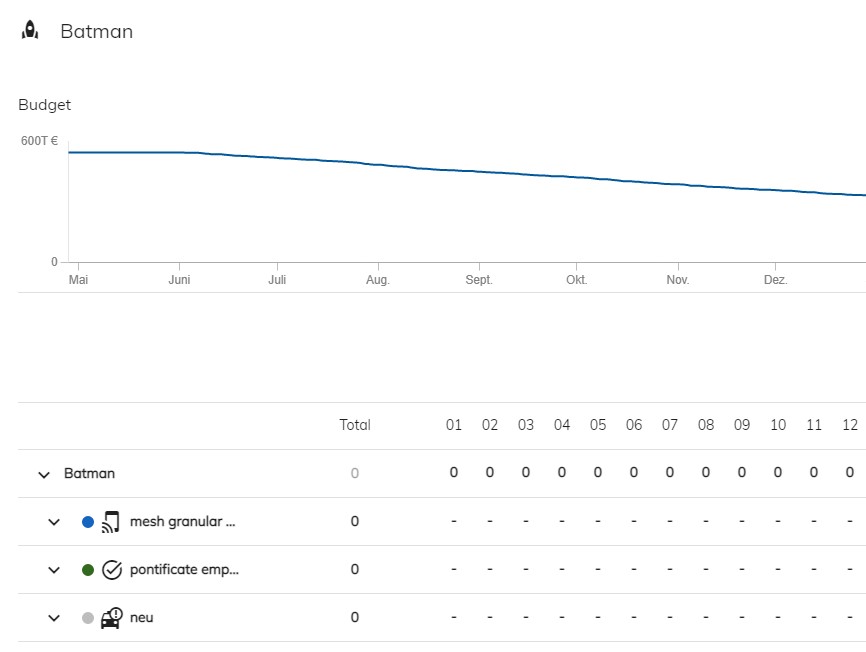
  • Project Management: In the project dossier, you can now view an additional burndown chart that visualizes the progression of your planned hours.
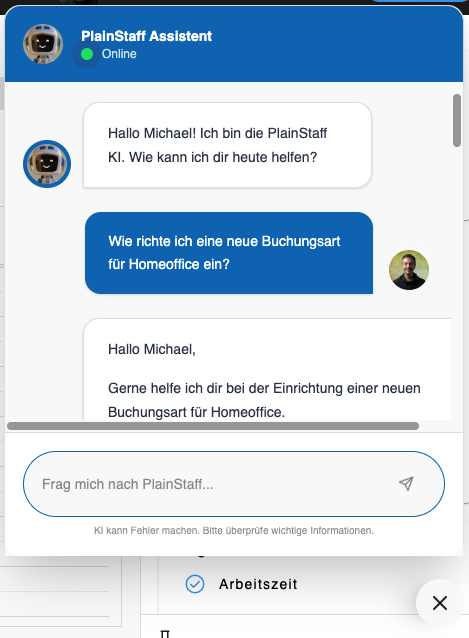
  • PlainStaff Assistant: In the bottom right corner, where the question mark button used to be, there is now a new option that leads you to the PlainStaff Assistant. It answers your questions and helps you with using the app.
The new PlainStaff Assistant - always available
Usability & Mobile

We have also worked on the user interface and the mobile view:

  • Optimized Registration: The registration screen has been optimized for mobile devices. If the PlainStaff app is not yet installed, new users will now be redirected directly to the App Store.
  • Help & Texts: The texts and help pages regarding company holidays have been revised and made more understandable.
  • Filter for inactive employees: In the employee overview, there is now a new filter option that allows you to specifically filter for inactive employees or display only active employees.
  • Break Calculation: The calculation of mandatory breaks can now be adjusted even more flexibly to your organization's needs using three new parameters.
Under the Hood

There is also news for administrators and developers:

  • Public API: We have added a new POST endpoint to the public API, through which work time entries can be created. The documentation for this has also been updated.
  • Infrastructure: The PlainStaff backend has been modernized and expanded. PlainStaff should now run noticeably faster.
  • New Setting for Booking Types: You can now decide for each booking type which user interface employees should be allowed to use to book them.
  • What-If Settings: In the basic settings, you will now find a button that allows you to test settings in PlainStaff first without them affecting the employees' time accounts. You can then display the calculated key figures in the employee overview and compare them with the current data.
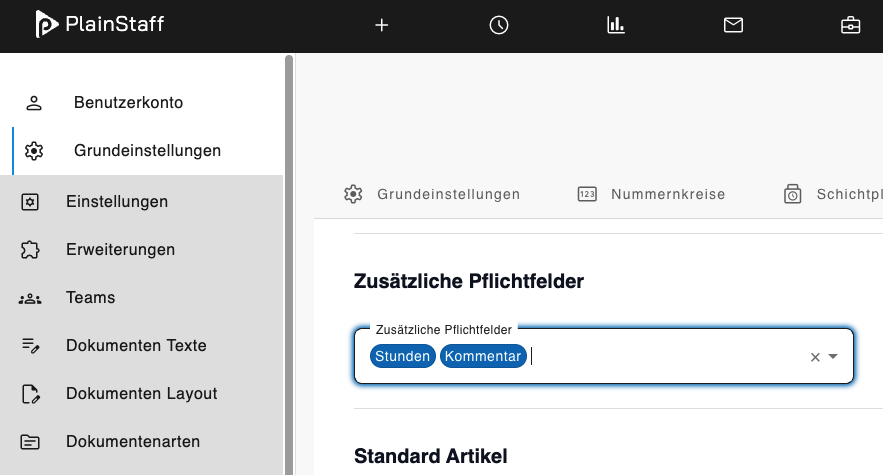
  • New Project Settings: In the project settings, you can now make the number of hours and the comment mandatory fields for project time entries. This can also be applied to all projects in the basic settings.
New setting for mandatory fields in project entries
Bug Fixes

We have fixed various bugs in the background to ensure everything runs smoothly. Here is an overview of the most important corrections:

  • Display issue when switching from hourly to time tracking resolved.
  • Missing calendar filter in the employee view added.
  • Sort function in the document list now works reliably.
  • Vacation calculation for employees without an assigned time model corrected.
  • Problem with empty project booking reports during multiple selection fixed.

We hope that these new features make your daily work easier! If you have any questions or would like to give feedback, please feel free to contact us at [email protected].

Best regards,

Your PlainStaff Team

2025-08-04
v6.1.0

Improvements in vacation management and more transparency

Hello dear PlainStaff users,

On 04.08.2025 the latest version of PlainStaff will be released, packed with improvements that will make your vacation management easier and more transparent.

The highlights at a glance:

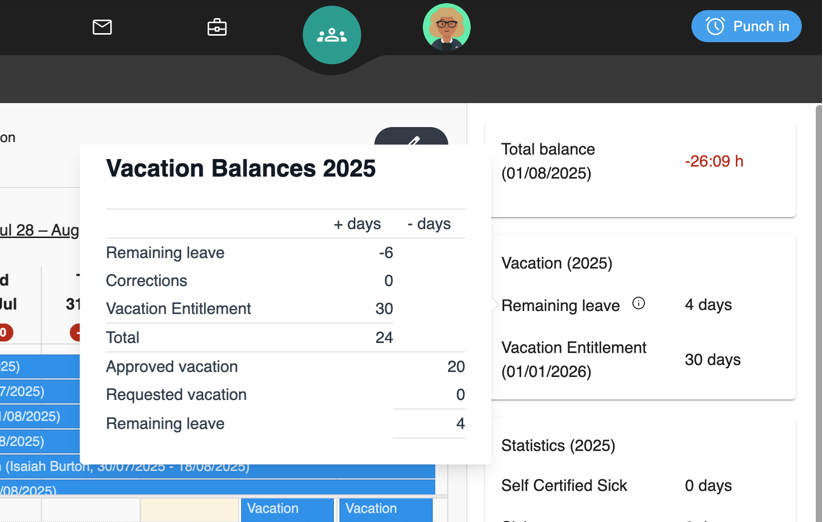
  • More precise vacation display: For customers who credit the vacation entitlement not on 1.1. but during the year or on the hiring date, the remaining vacation is now displayed correctly for the respective validity period, no longer at the end of the year.
  • Next vacation credit in view: Directly on the start page you can now see when and in what amount your next vacation credit will be.
  • Full transparency for bookings: When you apply for vacation, you will now be shown your already taken and your remaining vacation entitlement angezeigt.
  • Detailed vacation breakdown: A new info symbol next to the remaining vacation on the start page provides you with a detailed breakdown of the calculation.
  • Improvement in the calculation of company vacations: If a company vacation falls on a day on which an employee would not work anyway (according to working time model, due to illness or because a public holiday falls on that day), no vacation day is deducted for it.
  • Improvement in the calculation of vacation days: If two vacation bookings were accidentally recorded for the same day, only one vacation day is now deducted. If a sick note is received during the vacation, no vacation days are calculated for these days.
  • Stability improvements: Minor bugs have been fixed to further optimize the performance and reliability of PlainStaff.

We are continuously working to improve PlainStaff for you.

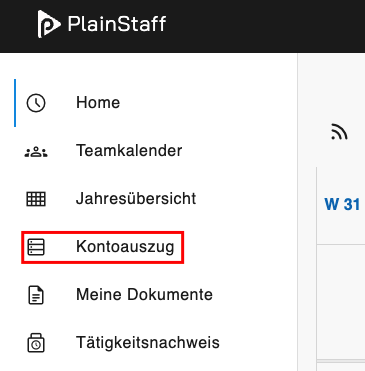
Due to the changes in the calculation of vacation days, the remaining vacation days of some employees may change slightly. To understand the changes, a look at the account statement is sufficient: Here it is shown for each day how much vacation was deducted from the account and what the current balance of the vacation account is.

Do you have any wishes or suggestions?

Your feedback helps us to set the right priorities for future updates. Let us know what you are missing or what we can do better!


Best regards,
Your PlainStaff Team

2025-05-29
v6.0.1

Important News Regarding Your PlainStaff Reports

Hello dear PlainStaff users,

we are pleased to announce some exciting improvements and new features for reporting in PlainStaff, which will be available to you from June 2, 2025. Our goal is to make working with your data even more flexible and convenient.

What's new? More formats, direct download and extended content!

In the future, your reports will not only be available in the usual CSV format, but also as Excel (XLSX) and JSON files. This gives you even more options to optimally process your data.

Another important change concerns the retrieval of reports: Instead of the previous email delivery, reports will be downloaded directly in your browser.

All detailed improvements at a glance:

  • Availability and Download: Your generated reports will now be stored on the server for 30 days for each user. You can find them at any time in the "Reports" section for re-download.
  • Format Selection: When creating a report, you can easily choose between the formats XLSX, CSV, and JSON.
  • Optimized Time Bookings: In the report for time bookings, working time is now shown in both minutes and hours, which provides more clarity.
  • Transparency in PDFs: The PDF files of the time accounts will in the future contain the creation time in the footer.
  • More Detailed Project Reports: The report for project bookings has been extended and now also shows the unit of the item and, if available, the start and end time of the bookings.

We are always striving to adapt PlainStaff to your needs and to continue improving it.

Is something still missing?

Should you have any suggestions or miss a specific report, do not hesitate to contact us. Your feedback is important to us!


Your PlainStaff Team

2025-05-12
v6.0.0

New Version of PlainStaff

A new version of PlainStaff will be available from May 12, 2025 (6.0.0). The user interface has been revised and now offers a better overview and easier usability. In addition, numerous customer requests have been implemented and minor bugs have been fixed. This newsletter provides an overview of the most important changes.

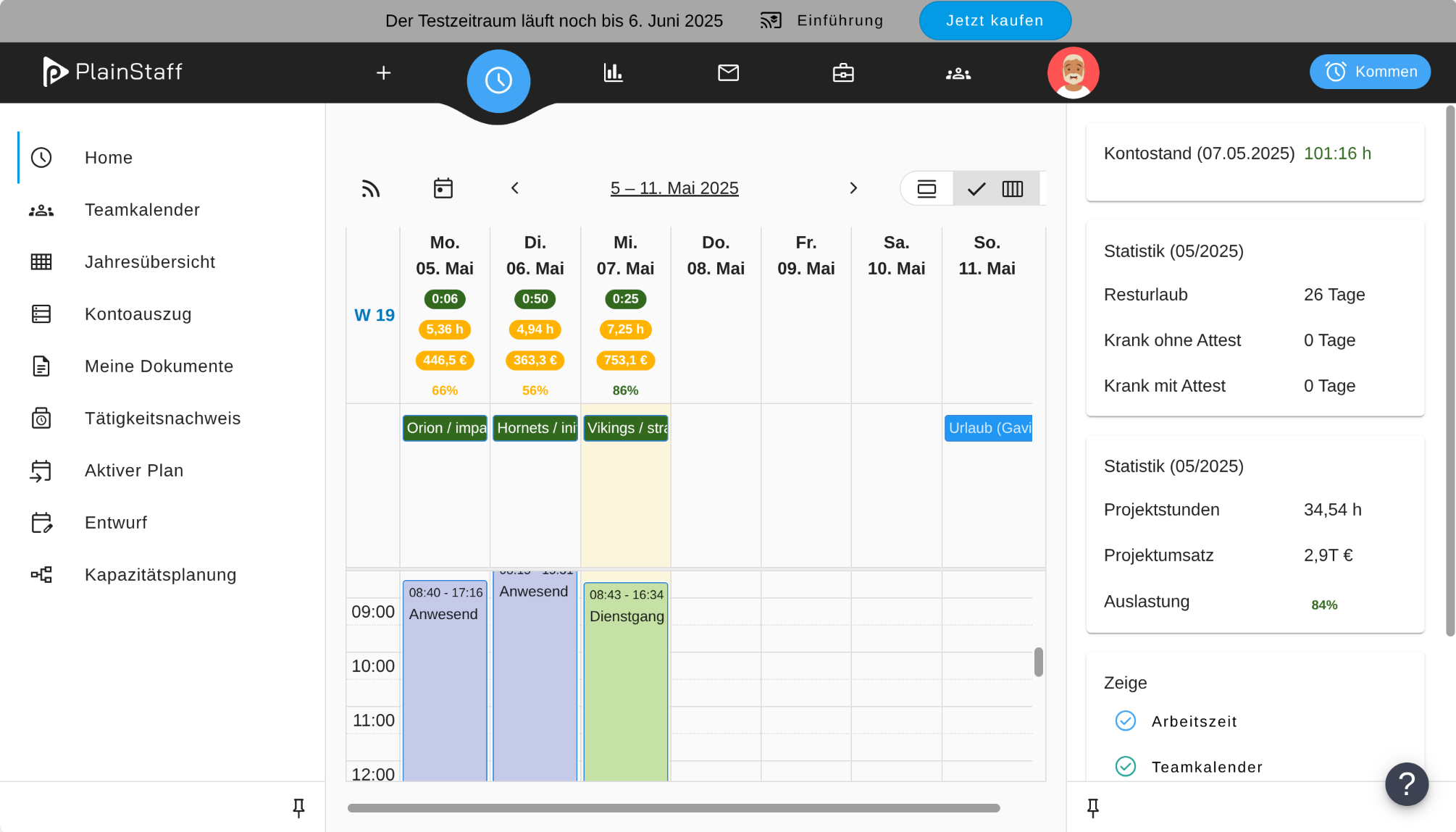
The new layout of the homepage
  • There is now a collapsible navigation bar on the left and right edges of the screen. This means that when the navigation bars are collapsed, the entire screen is available for content.
  • There is a new "Reports" menu in the top navigation, which summarizes all reports and exports from PlainStaff.
  • To make space for this menu, the settings have moved under the user profile on the far right. These are still only accessible to admins.
  • In the project file, the chart has moved to the right panel, which significantly increases the space for project bookings.
  • All forms have been revised and optimized.
  • In the calendar, clicking on a task now opens a dialog with details about the task and the option to create a booking directly.
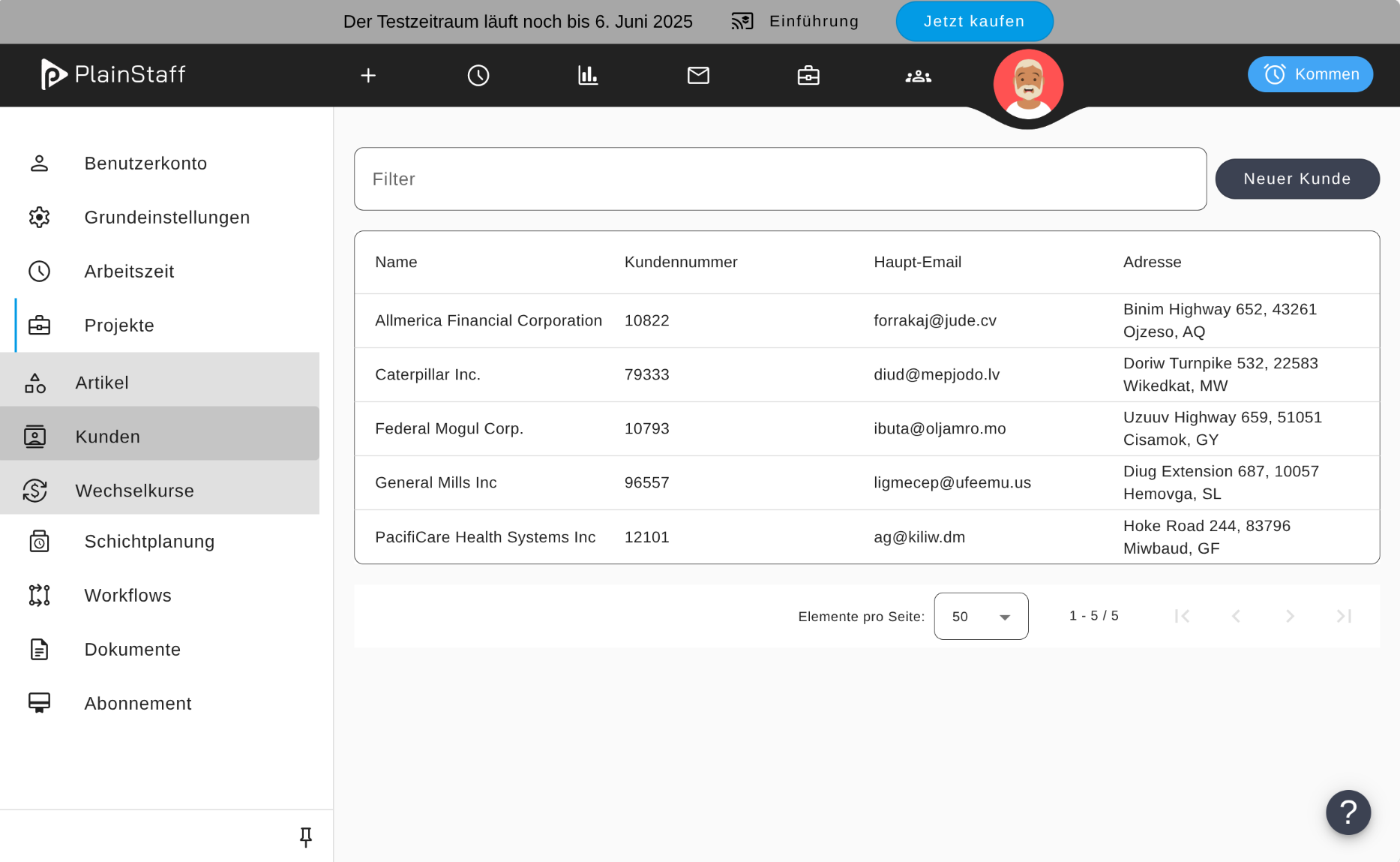
  • There is now a new menu item "Customers" in the settings, with which the customers known in the system can be edited.
New Customer List
  • The API keys can now be found in the user profile instead of in the settings. This gives every user access to the public API. Users without special rights can only see their own bookings via the API and only create bookings for themselves. If you want to deactivate your employees' access to the API, you can add "REST API" as a blocked application in the employee profile.
  • For projects without tasks, planning data such as start and end date or budget can now also be entered directly in the project dialog.
  • The layouts for the positions on invoices, activity reports and other documents are now saved per document type. This gives you the option to set a different configuration for your invoices than, for example, for the activity reports.
  • It can now be decided in the employee profile, analogous to the time account, whether a vacation account should be maintained for each employee or not. This switch is activated by default for all old and new employees.

We hope that the improvements in PlainStaff are useful and make your work easier. If you have any questions or suggestions, please send us a few lines to [email protected].

Your PlainStaff Team

2024-12-11
v5.5.0

New Version of PlainStaff

On December 16, 2024, version 5.5.0 of PlainStaff will be released. This will extend PlainStaff with a document archive and provide the long-awaited support for half vacation days.

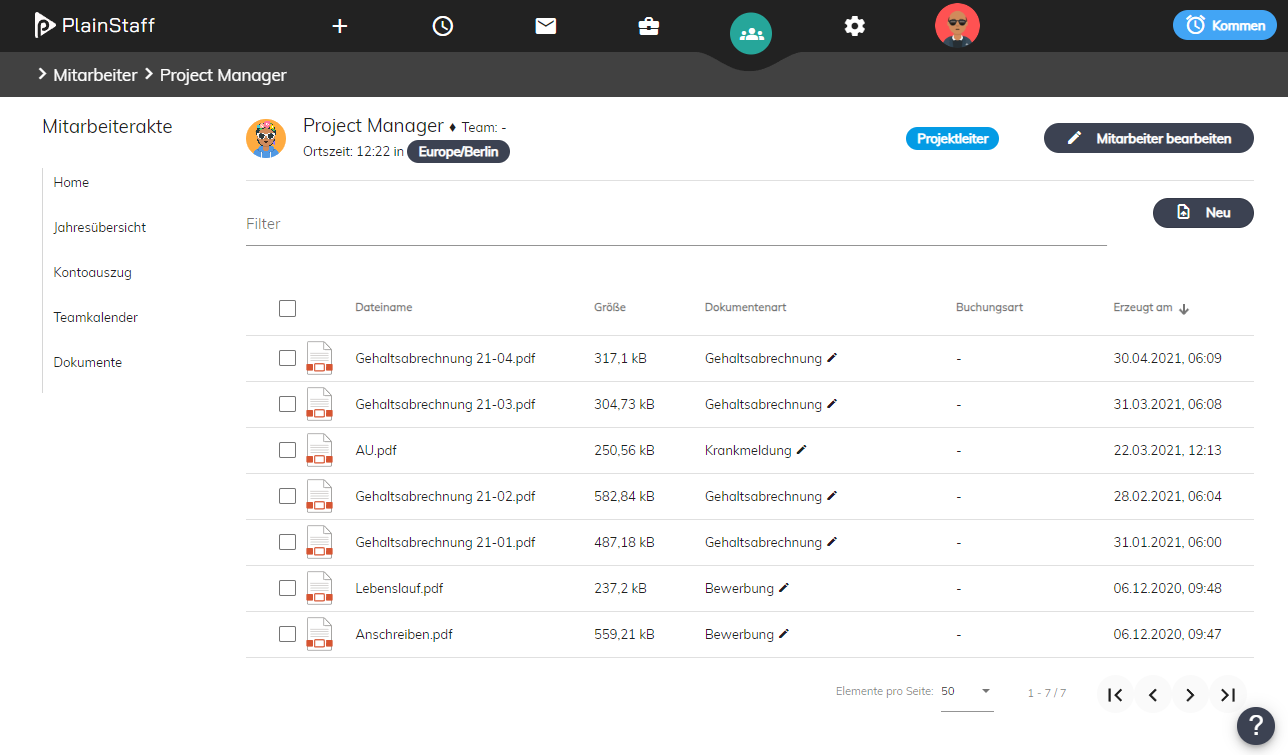
The electronic personnel file
The Document Archive

The PlainStaff document archive supports the storage of any documents (photos, PDFs, Office, video, etc.) for the following objects:

  • Working time bookings
  • Project time bookings
  • Employees (keyword "Digital personnel file")
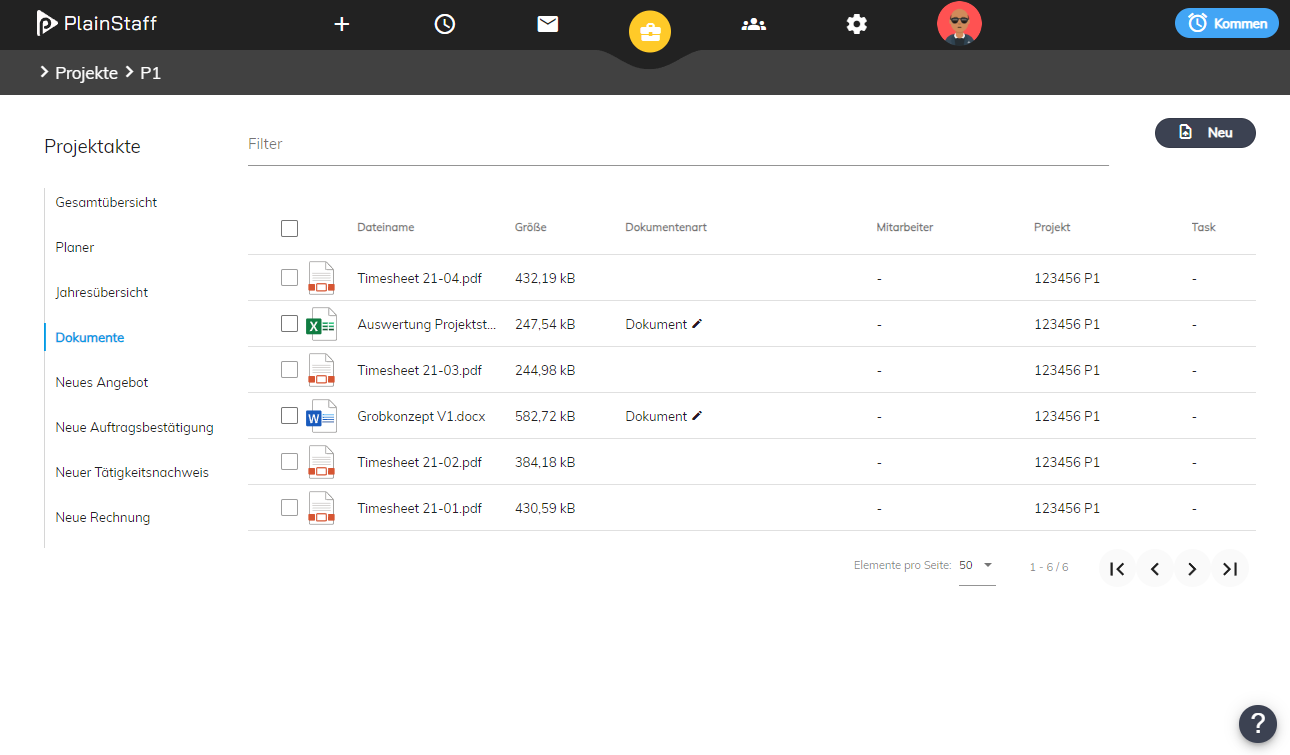
  • Projects (keyword "Digital project file")

For example, employees can upload a photo of their sick leave together with their sick leave booking, which then automatically ends up in the electronic personnel file or take photos on site at the construction site, which are then automatically archived in the electronic project file. Initially, 10 GB of storage space is available per employee. Additional storage can be booked for €18.90 per terabyte per month.

Details on configuring the document archive can be found here: https://plainstaff.com/en/help/documenttypes-documentarchive/

The electronic project file
Half Vacation Days

The new release finally supports the long-awaited half vacation days. There is a new booking type in your system with which employees can apply for half vacation days themselves. IMPORTANT: This must be activated by you (activate the "Usage by employees" switch)! In addition, there are two new types of company holidays:

  • Company holiday half vacation day: Employees are credited with the full day as working time (Actual = Target), but only half a day of vacation is deducted.
  • Half day company holiday: Employees are credited with half a day as working time (Actual = 1/2 Target) and half a day of vacation is deducted.
Mobile App

In addition to the functions for uploading documents for time and project bookings, the Mobile App receives an option to show or hide tasks in the calendar.

We hope that the improvements in PlainStaff are useful and make your work easier. If you have any questions or suggestions, please send us a few lines to [email protected].

We also wish you all a peaceful holiday season and a happy and successful 2025!

Your PlainStaff Team

2024-11-13
v5.4.1

New Version of PlainStaff

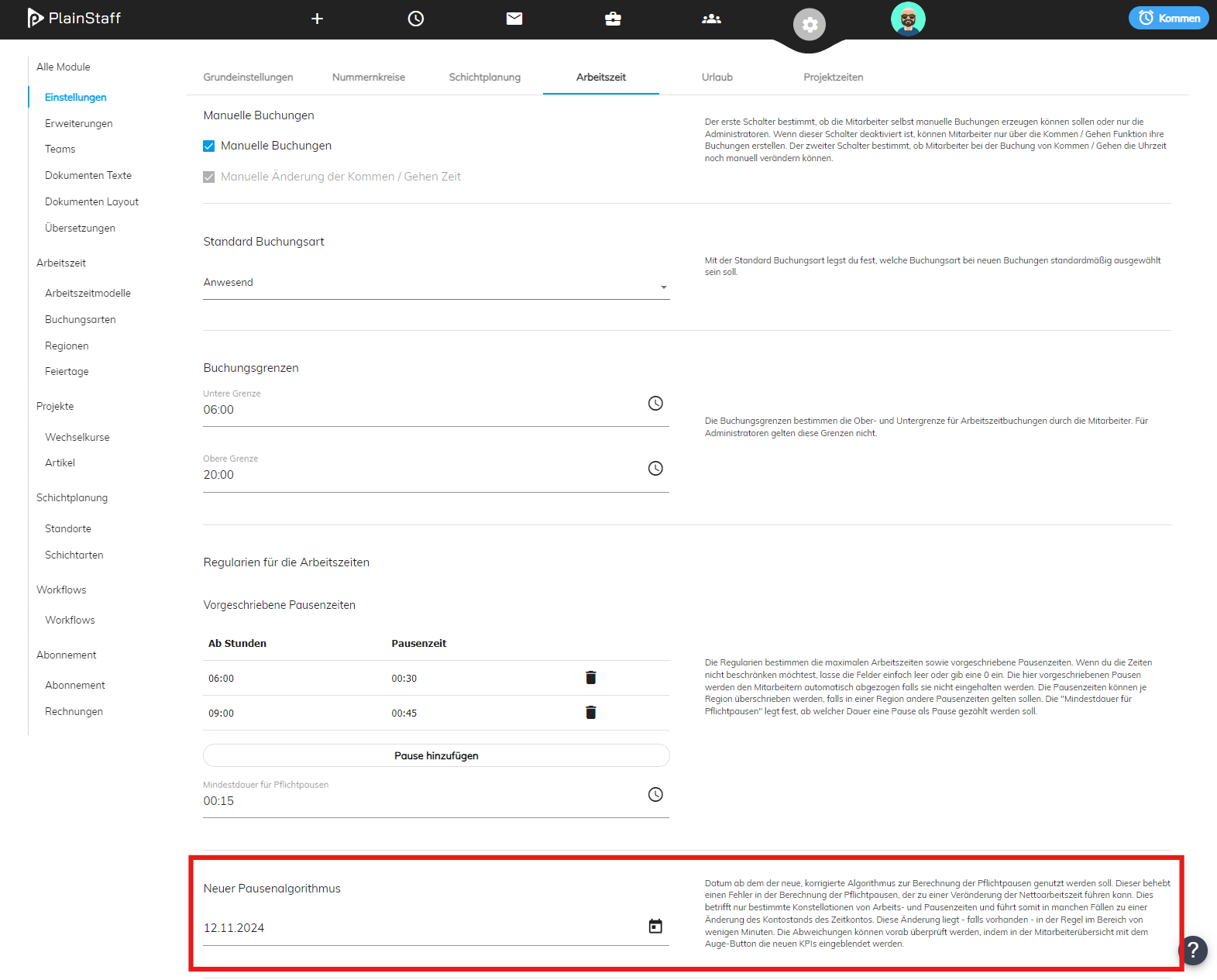
On November 18, 2024, version 5.4.1 of PlainStaff will be released, which fixes a bug in the calculation of net working time. This only affects time tracking, not all customers, and only some employees. You can tell if your PlainStaff is affected if, from November 18, 2024, the new parameter "New break algorithm" can be found in your time tracking settings:

This new parameter is pre-filled by us with 01.01.2030, which means that nothing changes for your employees initially. With this setting, the old algorithm will continue to be used unchanged until December 31, 2029.

Recommended procedure

If your PlainStaff is affected by the error in the calculation of mandatory breaks, this can lead to a change in net working time. This only affects certain constellations of working and break times and thus in some cases leads to a change in the balance of the time account. This change - if present - is usually in the minute range.

There are basically two ways to deal with the error:

  1. You switch the algorithm on a key date (e.g., 01.11.2024) and keep the incorrect calculation of mandatory breaks unchanged until this key date.
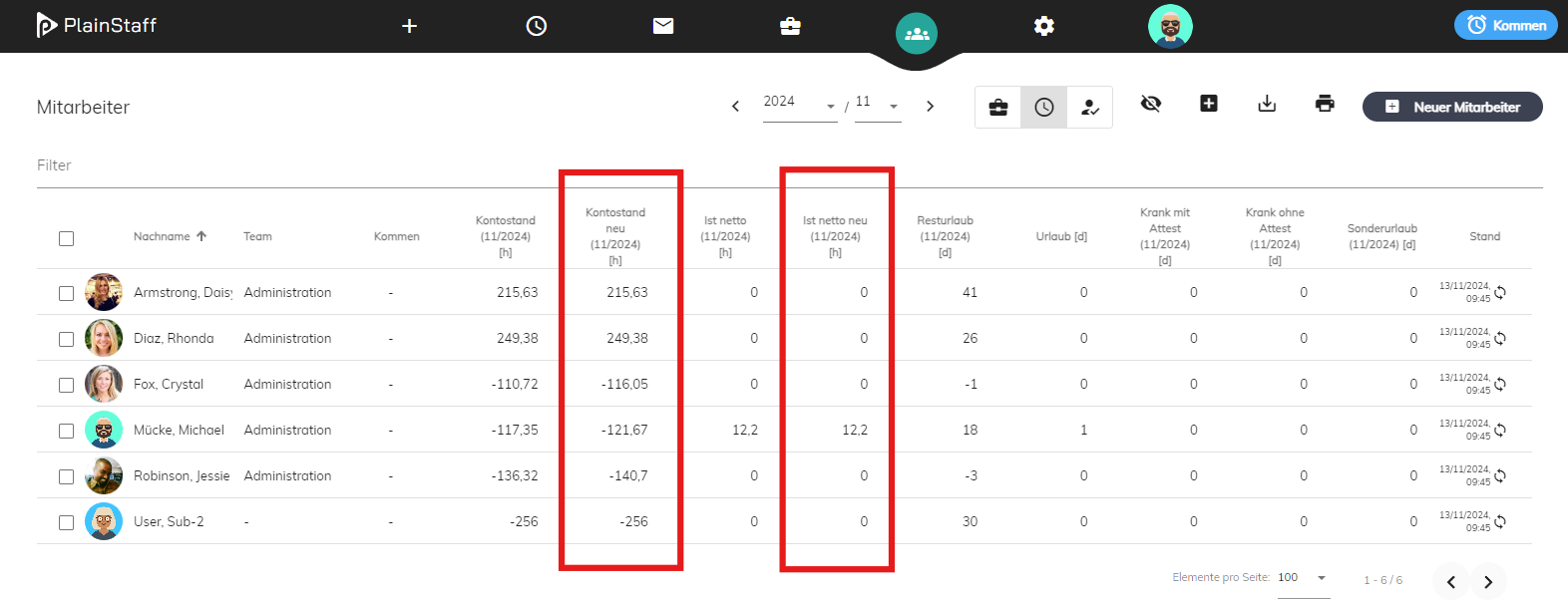
  2. You inform the affected employees about the change in the time account and then set the date for the new algorithm to the start date of your PlainStaff. This means that the new algorithm will always be used for all employees. The changes this means for the time accounts can be displayed in advance in the employee overview using the eye button as additional columns:
Changes in the PlainStaff API

There is a new function to retrieve the PDFs of employee accounts. Details can be found here: https://plainstaff.com/en/public-api/#tag/Time-Account-PDF

We hope that the improvements in PlainStaff are useful and make your work easier. If you have any questions or suggestions, please send us a few lines to [email protected].

Your PlainStaff Team

2024-08-21
v5.4.0

New Version of PlainStaff

Finally, the time has come! A new version of PlainStaff will be available from August 26, 2024 (5.4.0). This release was all about customer requests. We were able to implement a good dozen of them. This newsletter provides an overview of the most important changes.

The new layout of the homepage
Changes and innovations on the homepage
  • You can now see all your ongoing and current project tasks, to which you are assigned, clearly listed at the top and can also book directly to the individual tasks there.
  • You can now adjust the size of the upper area of the calendar yourself.
  • You can now better organize your calendar using the "show/hide" functions by being able to show and hide your own working hours, project times, current tasks, shift schedules, and the team calendar at any time. Furthermore, you can also filter the tasks by projects to get a better overview.
  • You can now book working hours even more easily by simply using the new "come"/"go" button at the top right.
  • Using the Wi-Fi symbol at the top left above your calendar, you can easily transfer your PlainStaff calendar to your Outlook/Google/iCloud calendar to always see your recorded working hours there.
More individuality and color through randomly generated avatars or uploading your own photo as a profile picture.
Task management in project planning

The new release takes a first step towards being able to use PlainStaff for project planning as well. Instead of editing tasks via the project dialog, this can now be done easily directly in the project file. Below, as currently, you can see all ongoing tasks and their bookings. There you can now add new tasks to the project as well as subtasks to tasks via "+ New Task". It is also possible to make bookings directly on the tasks there. The name and description of the tasks are displayed directly to the employees in the calendar, which simplifies communication about the content of the task and at the same time creates commitment.

If desired, it is now also possible to delete vacation requests from the inbox yourself.
More individual working time models

Working time models can now be customized in even more detail. You can find the setting for this in the working time model under the button "Override working time settings". This means that all rules for time tracking can now be individually changed for each model according to your needs. This applies to

  • Mandatory breaks
  • Booking limits
  • Permission for manual bookings
  • Allowed weekdays
  • Booking on holidays
Your PlainStaff URL can be changed later in the general settings.
Integration with weclapp

The weclapp integration can now also handle subtasks. Tasks, including any existing subtasks, are synchronized in both directions. Regardless of whether changes are made in weclapp or in PlainStaff, both systems are always kept in sync (only for the new project orders). This applies to

  • Task name
  • Description
  • Start and end date
  • Assigned employees
  • Status
In addition, PlainStaff can now also correctly handle fixed-price tasks.

New Version of the Smartphone App

The smartphone app has been completely overhauled and is now much clearer and significantly more performant. Simultaneously with the new release an automatic update of the smartphone app will take place on all devices. If this update is not installed automatically, please delete the app from your device and reinstall it from the App Store.

Changes in the PlainStaff API

In the new release, the data structure for employees has changed. Details can be found here: https://plainstaff.com/en/public-api/#tag/Employees

We hope that the improvements in PlainStaff are useful and make your work easier. If you have any questions or suggestions, please send us a few lines to [email protected].

Your PlainStaff Team

2023-11-20
v5.3.1

New Version of PlainStaff

A new version of PlainStaff is available from November 20, 2023 (5.3.1). We were able to further improve the speed, especially when booking, and have implemented some customer requests.

We have fixed a bug in this release regarding the rounding of vacation entitlements. This may result in employees having one day more or less vacation entitlement than before, depending on the settings in your system. Please check the setting for rounding vacation entitlements under "Settings -> Vacation -> Rounding mode for vacation entitlements" and adjust it if necessary. Thank you!
New Functions
  • When importing projects from weclapp, the document number from weclapp can now also be transferred. For this, there is the new "Synchronize project number" switch in the weclapp settings.
  • Some switches have been replaced by checkboxes, as it is easier to see whether they are selected or deselected. We will continue this step by step until all switches are removed.
  • The speed of booking times has been greatly improved. For this, the balances are not displayed immediately, but with a small delay.
  • There is now a new extension for Notion, with which projects and tasks can be imported from Notion to PlainStaff.

We hope that the improvements in PlainStaff are useful and make your work easier. If you have any questions or suggestions, please send us a few lines to [email protected].

Your PlainStaff Team

2023-10-23
v5.3.0

New Version of PlainStaff

A new version of PlainStaff is available from October 23, 2023 (5.3.0). This time, the focus was on improving performance and stability.

We hope that the improvements in PlainStaff are useful and make your work easier. If you have any questions or suggestions, please send us a few lines to [email protected].

Your PlainStaff Team

2023-07-09
v5.2.0

New Version of PlainStaff

Starting 09.07.2023, a new version of PlainStaff is available (5.2.0). In addition to several bug fixes, we have primarily focused on implementing several customer ideas.

Improvements in this release
  • When importing projects from weclapp, subtasks of service items are now also imported. In addition, changes in PlainStaff, e.g. to start and end dates or assigned employees, are synchronized back to weclapp.
  • The calendar view has been optimized and now only displays data once the data belonging to the current employee has also been loaded.
  • There is now a recycle bin in which deleted projects are stored.
  • Time entries in the time account are now sorted by start time.
  • The display of the remaining budget in the project overview can be toggled between % and €.
  • The loading time of the time account has been improved.

We hope that the improvements in PlainStaff are useful and make your work easier. If you have any questions or suggestions, please just send us a few lines to [email protected].

Your PlainStaff Team

2023-06-19
v5.1.0

New Version of PlainStaff

Starting 19.06.2023, a new version of PlainStaff is available (5.1.0). This time the focus was on vacation planning and interfaces (especially weclapp).

Since a lot has changed in the calculation of vacation in this release and some errors were also fixed that in some cases led to incorrect vacation days, please check the vacation days of your employees for accuracy. In particular, the start and end of the time model are now taken into account and the vacation is converted pro rata if the time model starts or ends during the year. Thank you!
More flexibility in vacation calculation
Improvements in vacation planning

There are the following improvements in vacation planning and calculation:

  • Vacation calculation can now, as is common in Austria, take place not only from a fixed date but also from the entry date of the employees (gear icon -> Settings -> Vacation -> Annual vacation credit).
  • Employees receive the "Entry date" field for calculating vacation. This is only relevant if the vacation entitlement is credited to employees in the month of entry. In the course of moving to the new release, we attempted to determine the entry date automatically based on the time model.
  • The new "Exit date" field for employees allows departed employees to be retained in the system, since no license is charged after the exit date.
  • Vacation entitlement is now correctly converted pro rata for entry and exit years.
Items in Project Time Tracking
Changes in Project Time Tracking

The main change in Project Time Tracking is the introduction of items (gear icon -> Items):

  • Booking types in project time tracking now become items, as this makes more sense in the context of projects. This gives former booking types the possibility of using units other than 'hours' or 'pieces' (e.g. 'km' or 'kg').
  • Existing project booking types are automatically converted into items. For employees, nothing changes except the designation "Item" instead of "Booking type".
  • Previous "fixed price" booking types are replaced by items with the unit "piece". If the fixed-price booking type did not previously have a standard price, it now automatically receives the unit price 100 in the home currency.
  • Project times can now alternatively be entered as 1.5 / 1,5 or 1:30.
  • The booking dialog for project times now only shows the projects / tasks that are active on the selected date.
Complete overhaul of the weclapp interface
Changes to the weclapp interface

The weclapp interface saw the most improvements in this release. It was completely overhauled. The current processing can still be retained. The following innovations are available (details here):

  • Items from weclapp can be imported into PlainStaff automatically together with units and filtered by product groups. In PlainStaff, you can then decide which of these items should be available for employees to book.
  • New orders (including project orders) can be imported automatically into PlainStaff from a certain status onwards.
  • "Old" projects can also be imported automatically from weclapp into PlainStaff.
  • For service line items or tasks in orders, times from PlainStaff can be transferred back to weclapp automatically, immediately upon booking.
  • In interaction with weclapp, the following invoicing processes can now be mapped (they can be set differently per project):
    • Free-text invoices for any project in PlainStaff
    • Creation of partial invoices for projects linked to an order
    • Adjustment of quantities in the order to the quantities recorded in PlainStaff

We hope that the improvements in PlainStaff are useful and make your work easier. If you have any questions or suggestions, please just send us a few lines to [email protected].

Your PlainStaff Team

2023-03-31
v5.0.0

New Version of PlainStaff

Starting 06.04.2023, a new version of PlainStaff is available (5.0.0). This new release brings the long-awaited Capacity Planning to PlainStaff. With its help, projects can be planned better and more clearly, and above all, the workload of employees in project planning can be optimized at a glance. The new Capacity Planning is a dedicated module in PlainStaff and can be ordered separately. The same discounts apply as for the other modules (20% for 2 and 30% for 3 or more modules). If you would simply like to get to know Capacity Planning, just set up a new test tenant with us or arrange a free online demo.

Capacity Planning of all active projects at a glance.
Clear planning of all projects
Capacity Planning shows all projects at a glance. Tasks can easily be moved, added, extended, or shortened with the mouse. The time scale can be switched between days, weeks, and months, and the plan can be enlarged to full screen. With the filter, the planning can quickly be filtered to individual employees or departments.
Project planning on the entire screen
Capacity Planning of employees
In the lower area of project planning, the current workload of employees is displayed. The capacity of employees results from the time model, but can also be adjusted individually. In addition, if Employee Time Tracking is also licensed, bookings such as vacation / illness / training are automatically taken into account in the capacity.

We hope that the improvements in PlainStaff are useful and make your work easier. If you have any questions or suggestions, please just send us a few lines to [email protected].

Your PlainStaff Team

2023-03-20
v4.0.4

New Patch for PlainStaff

Starting 22.03.2023, a new patch for PlainStaff is available (4.0.4). It provides further performance improvements and fixes a bug that could lead to duplication of project bookings. If your PlainStaff is affected by this bug, you will receive a separate message from us with a list of the affected bookings.

We hope that the improved performance in PlainStaff is noticeable. Feel free to tell us how you experience the performance at [email protected].

Your PlainStaff Team

2023-03-05
v4.0.3

New Patch for PlainStaff

Starting 06.03.2023, a new patch for PlainStaff is available (4.0.3). With this patch, we have continued to work intensively on improving performance.

Important: Please inform your users that there is also a new version of the smartphone app, which will be installed automatically when the app is restarted. The old version of the smartphone app will no longer work.

We hope that the improved performance in PlainStaff is noticeable. Feel free to tell us how you experience the performance at [email protected].

Your PlainStaff Team

2023-01-20
v4.0.2

New Patch for PlainStaff

Starting 23.01.2023, a new patch for PlainStaff is available (4.0.2). The main focus of this patch was on improving performance, especially when saving project bookings.

Standard item layout for new projects.
New features and improvements
  • In the settings for Project Time Tracking, the default setting for the item layout for new projects can be defined.
  • In the employee overview, in addition to remaining leave, vacation taken and actual working time are also displayed.
  • In the employee overview, an Excel export with the statistics of all employees for a month can now also be generated.
  • The file name of the timesheets now also contains the project name for better distinction.

In addition, several bugs were fixed.

We hope that the improvements in PlainStaff are useful and make your work easier. If you have any questions or suggestions, please just send us a few lines to [email protected].

Your PlainStaff Team

2022-11-10
v4.0.0

New Version of PlainStaff

Starting 14.11.2022, a new version of PlainStaff is available (4.0.0). A lot has happened again in this release. We present the most important new features to you in this newsletter.

The new home page with all information at a glance.
New home page for employees
On the new home page you have all important information at a glance. The calendar shows all booking information (working times, project times, public holidays, vacation, teammates' absences, and any shifts you are scheduled for). The statistics give you an overview of remaining leave, total balance, and project times, among other things, and the list of the last 10 bookings not only shows what happened recently but also allows you to copy these bookings with a single click. The calendar can be switched between a day, week, and month view.
New, separate team calendar
New team overview
With the help of the new team overview, you can see all team calendar entries of your team for an entire month in one overview. In addition, the calendar displays the public holidays that apply to the individual employee.
New Shift Planner module.
Shift Planner
With the new release, you can now also define varying working hours based on shift planning. Employees and workplaces are assigned to shifts. Employees see their shifts in their calendar, and in the team overview the planned working hours are compared with the actual working hours. In the settings, a rest period between shifts can be specified, which is then automatically complied with for all employees.
Project bookings with times
A new setting allows project bookings to be recorded with times instead of just the number of hours. In addition, these bookings can then be directly linked to a working time booking, so that project time and working time can be recorded in a single step.
Further Improvements
  • For each employee, it can be configured which frontends they are allowed to access (Web, Mobile + Multi User Mode)
  • New KPI EEB (Estimated End Of Budget) for projects, which calculates based on the last 7 days on which day the budget will be exhausted
  • Holiday calendar for Greece, Lithuania, Turkey, and Croatia
  • Employee and project KPIs can be displayed for a single month or for the whole year

We hope that the improvements in PlainStaff are useful and make your work easier. If you have any questions or suggestions, please just send us a few lines to [email protected].

Your PlainStaff Team

2022-07-12
v3.2.1

New Release available

A new release is available. This time, the focus was primarily on improvements in document export and interfaces to partner systems.

New document types: Quote and Order Confirmation.
Improvements in Document Export
All document functions have been summarized in a new component called "Documents". Here, not only new documents can be created, but also already created documents can be viewed and retrieved.
Not only activity reports and invoices, but also quotes and order confirmations can now be generated directly from PlainStaff (provided the partner system supports this - currently only for lexoffice and weclapp). Project managers thus have everything they need for customer support in one place.
Documents can now also be generated directly from PlainStaff as PDF. This way, PlainStaff can also be used for quoting and invoicing without being connected to an accounting system. Document number ranges for these PDFs can also be flexibly configured in PlainStaff.
All documents generated from PlainStaff now have a uniform layout that can be flexibly adapted to your own needs.
Flexible adjustment of the document layout.
Improvements in Time Tracking
New calculation method "Hourly booking limited to target". This allows booking types to be set up where employees cannot enter overtime. In addition, non-full-day booking types can now also be entered in the team calendar.
All Excel exports have been extended with additional columns, providing better analysis options.

We hope that the improvements in PlainStaff are useful and make your work easier. If you have any questions or suggestions, please send us a few lines to [email protected].

Your PlainStaff Team

2022-05-30
v3.2.0

New Release available

A new release is available. This time, the focus was primarily on improvements in time tracking.

New PDF export for time accounts.
Improvements in Time Tracking
The new PDF report for time accounts can be generated individually from the time account as well as for multiple employees from the employee overview.
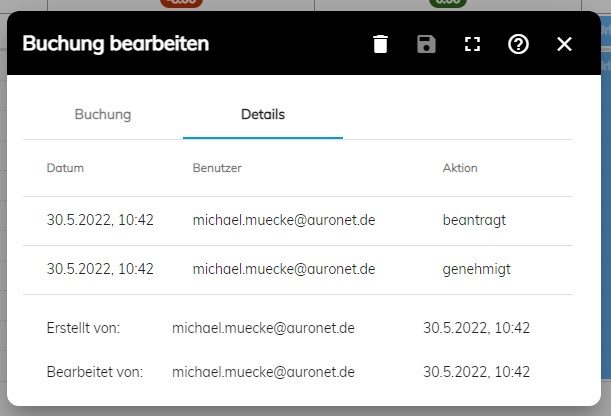
The approval log is now also displayed for individual bookings (if there has been an approval).
A limit for weekly and monthly working hours can now also be set in the working time model.
Icons and status for tasks and projects.
Improvements in Project Time Tracking
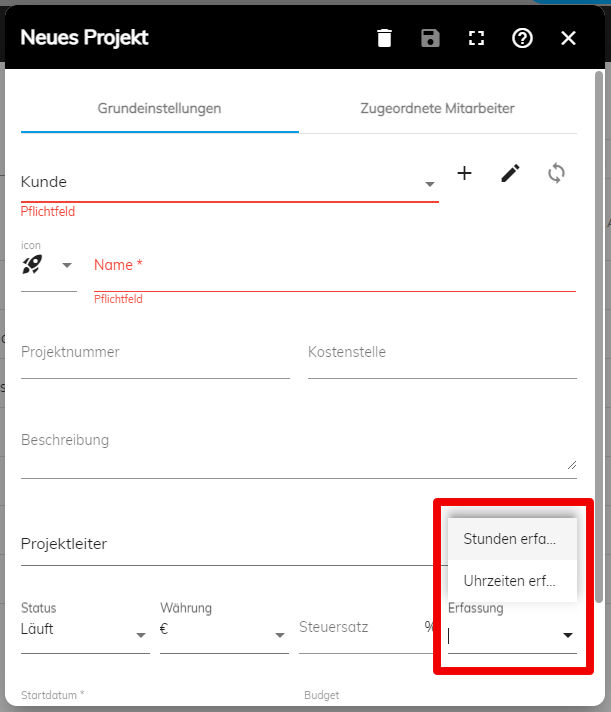
Projects and tasks can now be provided with an icon, and tasks now also have a status. Only tasks with status "New" or "Active" can be booked.
There is a new planning view for projects in the project file.
Project flat-rate booking types can now have a standard price.
The unbilled revenues are now also displayed for a specific month.

We hope that the improvements in PlainStaff are useful and make your work easier. If you have any questions or suggestions, please send us a few lines to [email protected].

Your PlainStaff Team

2022-03-04
v3.1.0

New Release available from March 7, 2022

The new release will be available from March 7, 2022. In addition to bug fixes and an important improvement in time tracking, this time the focus was primarily on the project module.

The new dialog for project times with selection of the booking type.
Flat Rate Projects and Project Expenses

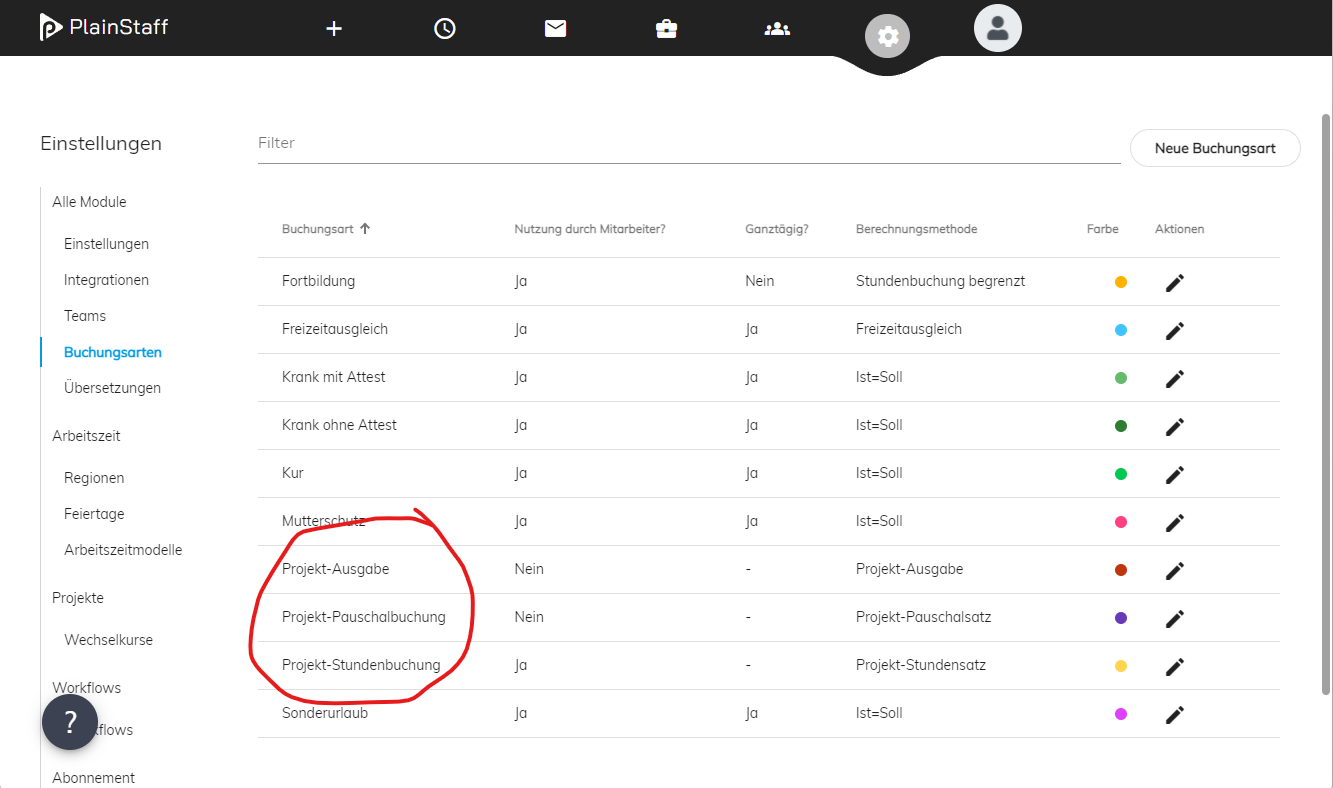
With the help of the three new booking types in project time tracking, in addition to times, flat rates and project expenses can now also be billed to the customer via PlainStaff.

Simply activate the predefined booking types for projects or create your own, and then select the appropriate booking type in the dialog for recording project times.

New booking types for flat rates and expenses.
Your Logo on the Activity Reports

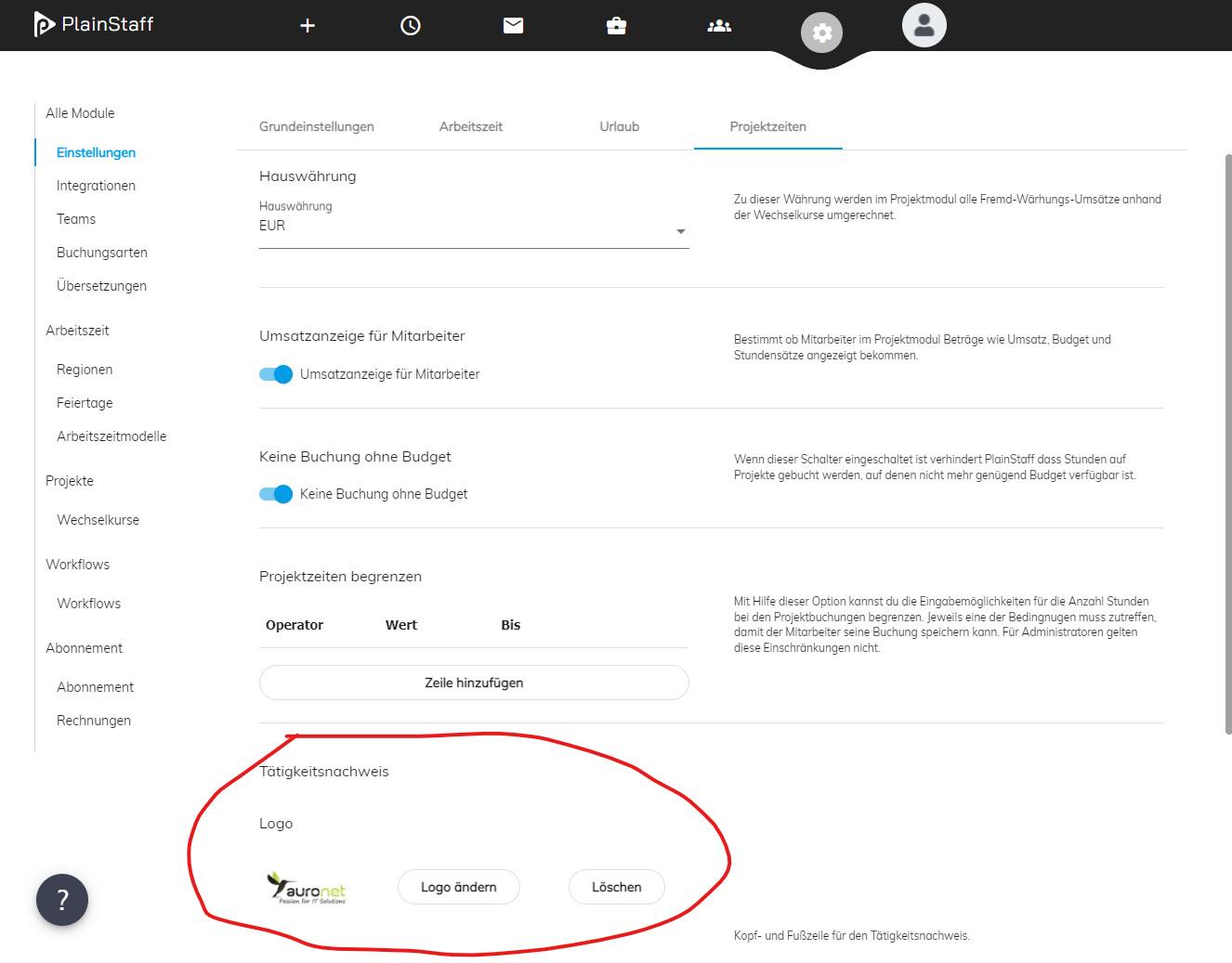
For the activity reports, you can now upload your own logo in the settings, which will be printed on the top right of the activity reports. This gives the activity reports a much more professional appearance.

Your logo on the activity reports.
New Options for Project Time Tracking

There are two new options with which project time tracking can now be even better adapted to your own needs.

On the one hand, employees can now be allowed to exceed the project budget with the booking, and on the other hand, the recordable times can be restricted (e.g., only full and half days).

New Option for Time Tracking

Via a setting in time tracking, employees can now be prohibited from making manual bookings themselves. Employees can then only record times via the stopwatch (come / go). Manual bookings can then only be made by administrators.

Easily create your own translations.
Translation and Customization of Texts

All texts in PlainStaff (button labels, table headers, menu entries, etc.) can now be translated or adapted to your own language usage. Simply click on "Translation" in the settings, select the target language, and enter the desired texts. Finally, don't forget to click the Save button, and the new texts will be available to all users in your client.

Bug Fixes

The following bugs are fixed with the new patch:

  • First admin account must also allow O365 auth
  • Employee overview missing padding
  • + button can create users without having enough licences
  • Fix Help-Links inside the app
  • Cannot close reset tenant dialog
  • Respect setting for Turnover display for employees also in the mobile app
  • Update project balances if budget of tasks change
  • Hide project stats in employee overview if no projects module is licenced
  • Login errors misleading
  • Enter confirms reset tenant dialog without verification
  • If project name is changed it is not updated in project component
  • Delete employee resets profile picture
  • CSV has problems with UTF-8 codepage so CSV should be replaced with XLSX everywhere

We hope that the improvements in PlainStaff are useful and make your work easier. If you have any questions or suggestions, please send us a few lines to [email protected].

Your PlainStaff Team

2021-11-26
v3.0.0

Welcome to the new PlainStaff!

The PlainStaff team has given their all in recent months and now it's finally here: The new PlainStaff. A total of more than 120 individual requirements and bug fixes from us and the PlainStaff community have been conceived, implemented, and tested. The result is a new, better PlainStaff with significantly tidier navigation, even easier usability, and new useful functions.

The new release will be available to all PlainStaff users from December 6, 2021.

Employee and project files as central entry points for managers and project leaders.
Employee and Project Files

All overviews and settings for employees and projects have been summarized in the employee or project file. This way, managers, project leaders, and administrators have all information in one central place.

Projects without tasks and assignment of teams or all employees.
Assignment of Employees to Projects

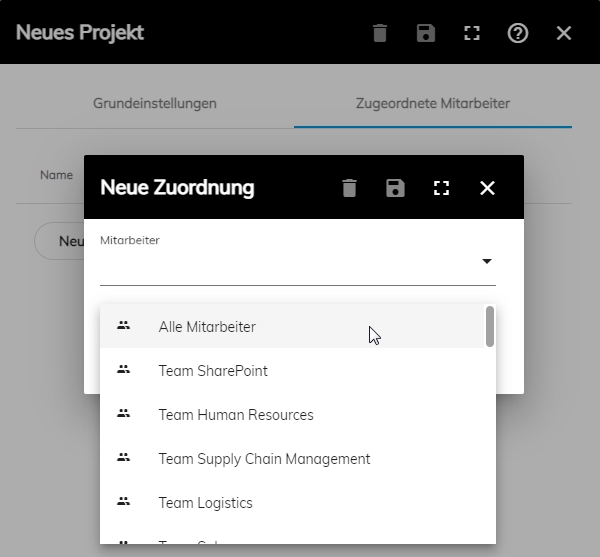
Employees can now also be assigned directly to a project instead of a task. This is particularly useful for smaller projects. It is also possible to assign all employees or all employees of a team at once.

The new annual calendar provides an overview of all bookings for a year.
Further New Functions
  • Annual calendar for working and project times
  • Project selection can now also be filtered by customer
  • Time off in lieu and sickness now also possible hourly
Bug Fixes
  • Project booking + start/end task not possible in the app
  • BR/GF has no access to employee project time tracking
  • Manager who is not project admin can see the projects menu but cannot click on it
  • New customers are not immediately added to the combo box in new project dialog
  • Project import should only import open orders
  • Update PlainStaff project if order in weclapp gets changed
  • When adding employees to tasks, they are not immediately displayed in the project file
  • Popup blocker results in error message for lexoffice integration
  • Mitarbeiterübersicht shows all employees for manager of one user
  • Validator for task budget does not work correctly for edited bookings
  • No hint for profile image file size
  • Superiors do not appear on profile

We hope that the improvements in the newly designed PlainStaff are useful and make your work easier. If you have any questions or suggestions, please send us a few lines to [email protected].

Your PlainStaff Team