
An e-invoice is not a PDF sent by email – it is a structured data set the recipient's accounting software can read automatically. The common basis across Europe is the EN 16931 norm; individual countries extend it with their own profiles and transmission channels – Germany with XRechnung and ZUGFeRD, France with Factur-X, large parts of the EU with Peppol BIS.
PlainStaff produces these formats straight from your project billing. Which ones you can choose depends on your company's country: every plan gives you exactly the formats that are customary or mandated there – XRechnung and ZUGFeRD in Germany, Factur-X in France, ZUGFeRD and Peppol BIS in Austria, Peppol BIS in Belgium or the Netherlands. The Gold plan unlocks the remaining profiles as well, so you can bill every customer in the format of their country.
Does e-invoicing already apply to me? That is decided per country and per type of recipient. Invoices to public authorities (B2G) have had to be electronic across much of Europe for years; in B2B, countries are following on different timetables – Germany, for instance, has required businesses to be able to receive e-invoices since January 1, 2025, with the full obligation to issue them from 2027. PlainStaff shows the current assessment for every customer country, including its source and review date, right in the customer record (see Country guidance below) – rely on that rather than on a year in a help article.
Prerequisites: complete your company data
For an e-invoice to pass the validation rules of its profile, your company profile must be complete. Open Settings → Company data and check:
- Company name, address (street, post code, city, country)
- VAT ID and tax number
- Email address and optional phone
- Bank account (IBAN, BIC, bank name)
- Payment means (e.g. bank transfer or SEPA direct debit) and payment terms
- E-invoice profile: your company default. It applies to every customer that has no format of their own – typically XRechnung 3.0.2 for authorities or ZUGFeRD 2.3 for business customers in Germany, Factur-X in France, Peppol BIS 3.0 in the Peppol countries.
The checklist on the page shows which mandatory fields are still missing – only issue e-invoices once it is complete.
The country drives the selection. Change the country in your company data and the list of available profiles changes with it. If your current profile is not available in the new country, PlainStaff switches to the format recommended there – it is only persisted once you save the company data.
Step 1: Maintain the customer master – recipient reference and VAT category
Every e-invoice carries a buyer reference (BT-10): the identifier the recipient uses to match the invoice to their own process. What belongs there depends on the recipient – a purchase order number, a cost centre, a contract mark. Public authorities often issue an identifier of their own; in Germany that is the Leitweg-ID, which is mandatory for XRechnung.
- Open Customers → Edit customer, section E-invoice.
- If the customer is a public authority, enable Public authority.
- Enter the identifier the recipient requires: the Leitweg-ID (German authorities) or the buyer reference (everybody else).
- Check: is the customer VAT-liable? If not, select the matching VAT category (e.g. E – exempt under Art. 151 of the VAT Directive, AE – reverse charge, K – intra-EU supply) and add the exemption reason if required.
- Save the customer.
BT-10 follows a fixed order of precedence: a stored Leitweg-ID always wins, then a buyer reference stored on the project, and finally the one stored on the customer. That way you can carry a separate purchase order number per project without touching the customer master.
Step 2: Pick a format per customer
By default every customer receives the company default profile from your company data. For a customer in another country that is often the wrong format: XRechnung is meaningless outside Germany, Belgium and the Netherlands expect Peppol BIS, France expects Factur-X.
In the E-invoice section of the customer master you therefore select a different format under E-invoice profile:
| Profile | What for | Available without Gold for companies in |
|---|---|---|
| EN 16931 – CII / UBL | The neutral European norm without a national extension | Italy (UBL) |
| Peppol BIS Billing 3.0 | EU-wide exchange over the Peppol network (UBL) | Austria, Belgium, Netherlands, Denmark, Sweden, Finland, Norway |
| Factur-X 1.07 | France, hybrid PDF following EN 16931 | France |
| XRechnung 3.0.2 | Public authorities in Germany (XML) | Germany |
| ZUGFeRD 2.3 (EN 16931) | B2B invoice as a hybrid PDF with embedded data | Germany, Austria, Switzerland, UK, USA |
Hybrid or pure XML? ZUGFeRD and Factur-X produce a single PDF with the data set embedded in it – the recipient sees a familiar document while their software reads the data. XRechnung, Peppol BIS and the EN 16931 profiles produce a plain XML file; PlainStaff files a readable PDF alongside it.
Profiles your plan does not unlock stay in the list – marked with a PRO badge – and become selectable with Gold. If PlainStaff has no guidance for your country, XRechnung and ZUGFeRD are the baseline.
Leave the selection on Default (company setting) and your company default keeps applying – dynamically: change it later in the company data and it takes effect immediately for every customer without a format of their own.
Country guidance. As soon as a country is stored on the customer, PlainStaff shows an assessment underneath. It depends not only on the country but also on whether the customer is a public authority, a business or a private person:
- Supported – PlainStaff produces the format customary there and email delivery is accepted.
- Handoff required – we produce the right document, but the country prescribes a transmission channel (e.g. the Peppol network, Chorus Pro in France, ZRE/OZG-RE in Germany, USP in Austria). You upload the file there or hand it to your e-invoicing provider.
- Not supported – the country requires a national format PlainStaff does not produce (e.g. FatturaPA in Italy, KSeF in Poland, Facturae in Spain, e-Factura in Romania). A provider that converts EN 16931 documents can cover this.
- Announced – an obligation has been decided but is not in force yet.
Every assessment carries its source and the date it was last reviewed. You pick the recommended format yourself from the drop-down; PlainStaff never changes it on its own here. The same assessment for your own country is shown under Settings → Company data, so you can choose the company default on the same basis.
Without the Gold plan you can freely pick the formats of your own country per customer; the remaining profiles stay visible but are marked PRO and cannot be selected. If a saved format is no longer available – because the plan changed or the company sits in a different country – the customer falls back to the company default, which is exactly how the backend builds the invoice.
Step 3: Create the invoice
- Open the project and select Export bookings in the time sheet.
- Choose E-invoice as the target and the billing period.
- PlainStaff validates the invoice before issuing it against the official rules of the selected profile – for the national profiles additionally against their extensions, such as the German BR-DE rules for XRechnung or the Peppol rules for Peppol BIS.
- If everything checks out the invoice is issued right away and the email composer opens (see step 5).
- Otherwise the panel lists the findings:
- Errors block. Each finding is explained in plain language; the link in the hint takes you directly to the screen where you can fix it.
- Warnings do not block. One example: if you invoice into another country while the line still carries your domestic standard rate, PlainStaff points this out – check whether reverse charge, an intra-EU supply or an export applies. Tick Acknowledge warnings and click Create invoice.
Step 4: Submit the invoice
PlainStaff creates the e-invoice and sends it by email. Whether that is enough is decided by the recipient and their country – exactly the assessment the country guidance shows in the customer record:
"Supported" – email is enough. The usual case for business customers. The email composer opens right after the invoice is created (see step 5); later you reach it from the archive via Resend. The invoice goes to the customer's e-invoice email address, falling back to their main address. ZUGFeRD and Factur-X are sent as a single hybrid PDF, XRechnung, Peppol and EN 16931 as a PDF plus a separate XML file.
"Handoff required" – download the file and submit it. PlainStaff does not serve Peppol, SdI (Italy), KSeF (Poland), Chorus Pro/PDP (France), ZRE/OZG-RE (Germany), USP (Austria) or comparable networks itself. Download the PDF and XML from the archive and hand them to your e-invoicing provider or upload them to the country's portal. Emailing a correctly produced Peppol BIS document is not Peppol delivery – the country guidance tells you upfront where this applies.
Example Germany (B2G): submission happens through the ZRE or OZG-RE portal (sign in with your ELSTER business account). Download the XML file from the invoice archive, sign in to the portal of the federal or the respective state government and submit it with the recipient's Leitweg-ID. Some authorities also accept the invoice by email to a published inbox – the contracting authority's instructions prevail.
"Not supported" – through a provider. If the country requires a national format PlainStaff does not produce, you need an e-invoicing provider that converts an EN 16931 document into that format and submits it. Issue the invoice in the neutral EN 16931 (CII or UBL) profile and hand the file to the provider.
Step 5: Email dispatch with templates and attachments
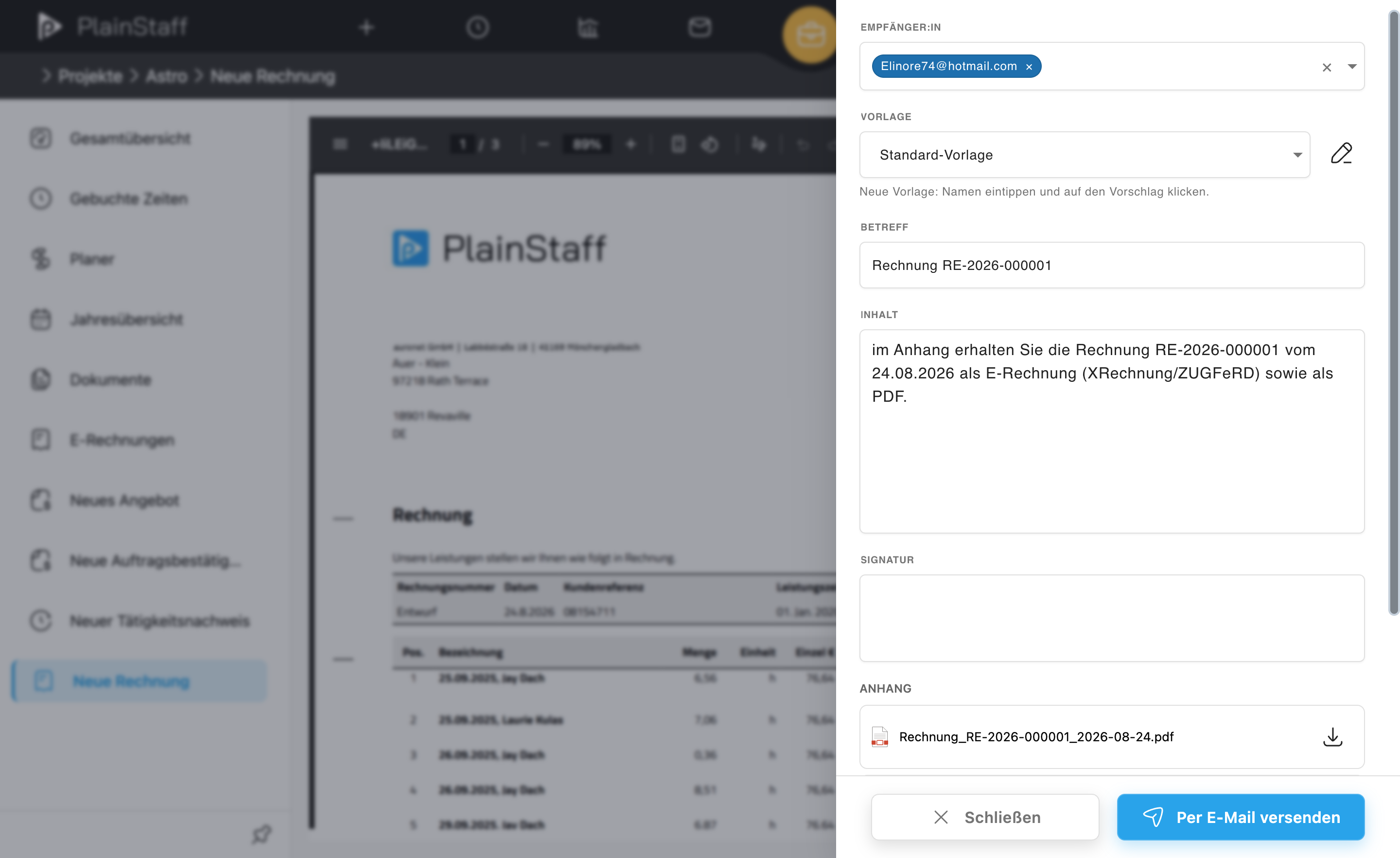
As soon as the invoice is created, the email composer opens in the same panel. You get the very same composer later from the archive via Resend.
- Recipients are prefilled from the customer's e-invoice email address (falling back to their main address). Additional addresses are typed straight into the field and confirmed from the suggestion.
- Template fills subject, body and signature in one go. Templates are maintained under Settings → General → E-mail templates; the one marked as default template is preselected when the composer opens. The pencil next to the picker edits the template without leaving the dispatch, and the suggestion in the picker creates a new one on the spot.
- Placeholders in subject, body and signature are substituted when the template is applied:
{{invoiceNumber}},{{issueDate}},{{dueDate}},{{customerName}},{{projectName}},{{companyName}},{{totalGross}}and{{currency}}. - Attachments: the invoice PDF and XML are attached automatically – for ZUGFeRD and Factur-X that is one single hybrid PDF. Further files (PDF, JPG or PNG, 20 MB in total) are dropped into the field below or picked by click.
Each customer can have a default email template of their own (Customers → Edit customer → E-invoice). It is preselected when composing an email to that customer and overrides the general default template. Templates can also be restricted to one language – handy when you write to customers in several countries.
Invoice archive: status, resending, cancellation
You find the central archive per project under Projects → Project → E-invoices and across all projects under Settings → Projects → E-invoices:
- Every invoice with number, invoice date, due date, customer, amounts, status (Draft, Issued, Sent, Cancelled), payment and profile
- Filter by text, status, billing period and payment (Open, Paid, Reminded, Overdue)
- Download PDF/XML – for the portal upload or the handoff to your provider
- Download reminder – every dunning level created sits in the archive as a PDF of its own
- Resend after failed delivery – opens the same email composer as on creation
- Mark as paid – and take it back when needed
- Create reminder – payment reminder, second or final reminder
- Cancel with a mandatory reason – PlainStaff automatically creates a credit note with its own number, marks the original invoice as cancelled and makes the times available for re-invoicing.
The profile column shows the format the document was actually produced in – not the one configured today. That is more than cosmetic: change your company default or a customer's format later and invoices already issued stay untouched. Resending and cancelling also fall back on the original format, so the credit note for an XRechnung is always an XRechnung again, even if the customer has since been switched to Peppol.
Payment receipt and due dates
The dispatch status describes the document (issued, sent, cancelled); the payment is a separate axis in a column of its own:
- Open – the invoice is out, the money is not in yet.
- Paid – set via Mark as paid; the tooltip shows the date of receipt. Mark as unpaid takes it back. The archived document is never touched in the process – only the receivable changes.
- 1st, 2nd or 3rd reminder – as soon as a reminder has been created; the column names the level reached.
The Due column shows the payment deadline. It follows from the invoice date plus the payment terms in your company data – once you have dunned, the new deadline from the latest reminder applies instead, and the tooltip names the level it came from. If the deadline has passed while the invoice is neither paid nor cancelled, the row is flagged Overdue and the tooltip states the number of days. An invoice due today is not overdue yet.
The filter Payment → Overdue shows you in two clicks every item that needs chasing.
Dunning: three levels
Reminders are created from the archive via the invoice's action menu → Create reminder → the level you want:
| Level | Name | Default dunning fee |
|---|---|---|
| 1 | Payment reminder | 0.00 |
| 2 | Second reminder | 5.00 |
| 3 | Final reminder | 10.00 |
The amounts are suggestions in the invoice's currency and can be changed freely – what you may actually charge in fees and default interest is governed by the law of your country and by your contract.
In the dialog you decide:
- Dunning level – levels must not be skipped; the next permitted level is preselected, higher ones are disabled.
- New payment deadline – 7 days from today by default.
- Dunning fee and default interest – the level's default fee is prefilled. The total claim of open amount, fee and interest is shown before you create the reminder.
- Send the reminder to the customer by email – optional, with a different recipient if you want; leave the field empty to use the address stored on the customer.
PlainStaff renders a PDF on your own letterhead in the customer's language, files it next to the invoice in the archive and mails it out right away if asked. Every level created stays available from the action menu via Download reminder 1/2/3.
Paid and cancelled invoices cannot be dunned. Mark an invoice as paid and the dunning path disappears; cancelling still creates a credit note and makes the times billable again.
Common errors
These findings occur regardless of the profile:
| Hint | Cause | Fix |
|---|---|---|
| VAT ID missing | Company data incomplete | Add the VAT ID under Settings → Company data |
| Bank details missing | No IBAN stored | Add the IBAN under Settings → Company data |
| Payment terms missing | No payment due date set | Configure payment terms in the company data |
| Warning: domestic tax rate for a customer abroad | The customer sits in another country but the line still carries category S at the standard rate | Check whether reverse charge (AE), an intra-EU supply (K) or an export (G) applies and adjust the VAT category on the customer |
These findings come from the national extensions of the respective profile:
| Hint | Profile | Cause and fix |
|---|---|---|
| BR-DE-15: Leitweg-ID missing | XRechnung | The customer is a public authority but no Leitweg-ID is stored – add it in the customer master |
| BR-DE-5: seller contact missing | XRechnung | XRechnung requires the seller's contact person – add it under Settings → Company data |
| BR-DE-1: payment terms missing | XRechnung | Configure payment terms in the company data |
| PEPPOL-EN16931-R004 / CL008: invalid endpoint scheme | Peppol BIS | Peppol identifies both parties by an identifier carrying a scheme code. PlainStaff derives it from the VAT ID – if yours or the customer's is missing, validation fails. Store the VAT ID in the company data and on the customer |
The Leitweg-ID is mandatory for XRechnung only – that is the German BR-DE-15 rule, not a European one. A customer in another country without a Leitweg-ID invoices fine under Peppol BIS, Factur-X or EN 16931; there the buyer reference is enough as BT-10, if the recipient asks for one at all.