1/7/2026

News at PlainStaff

Hello everyone,

We hope you are doing well! We have been working hard on PlainStaff again and are pleased to present the update to version 6.2.0 today. In addition to several practical new features, we’ve also made under-the-hood improvements to make the application even faster and more user-friendly for you.

General Features & Reports

In the general administration area, there are helpful extensions for reports and billing:

  • Filter for inactive employees: In the employee overview, there is now a new filter option that allows you to specifically filter for inactive employees or display only active employees.
  • Improved Reports:
    • You can now set a custom time interval for all reports.
    • With the double-arrow button in the report list, you can easily have an existing report recreated.
    • A new Payslip report is available, allowing for quick and easy payroll processing.
    • The time tracking report now also includes target hours for better comparison.
    • Corrections (vacation and time accounts) and additional KPIs have been added to the employee master data report.
  • Mass Invoicing: With the new "Send and Next" button, you can create an invoice in no time and automatically jump to the next project with billable hours. This saves a lot of time and makes invoicing even easier.
  • Project Management: In the project dossier, you can now view an additional burndown chart that visualizes the progression of your planned hours.
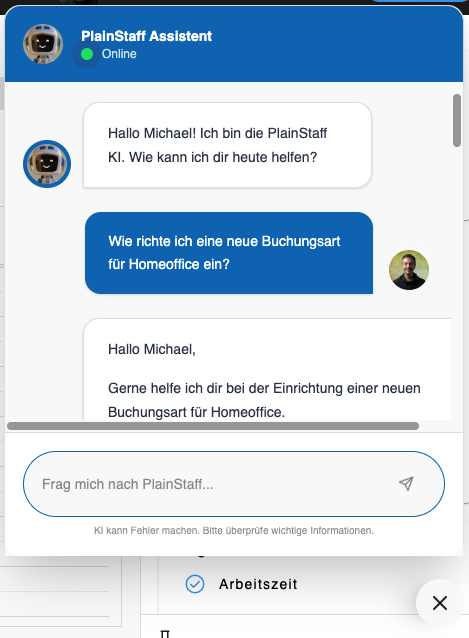
  • PlainStaff Assistant: In the bottom right corner, where the question mark button used to be, there is now a new option that leads you to the PlainStaff Assistant. It answers your questions and helps you with using the app.
The new PlainStaff Assistant - always available
Usability & Mobile

We have also worked on the user interface and the mobile view:

  • Optimized Registration: The registration screen has been optimized for mobile devices. If the PlainStaff app is not yet installed, new users will now be redirected directly to the App Store.
  • Help & Texts: The texts and help pages regarding company holidays have been revised and made more understandable.
  • Filter for inactive employees: In the employee overview, there is now a new filter option that allows you to specifically filter for inactive employees or display only active employees.
  • Break Calculation: The calculation of mandatory breaks can now be adjusted even more flexibly to your organization's needs using three new parameters.
Under the Hood

There is also news for administrators and developers:

  • Public API: We have added a new POST endpoint to the public API, through which work time entries can be created. The documentation for this has also been updated.
  • Infrastructure: The PlainStaff backend has been modernized and expanded. PlainStaff should now run noticeably faster.
  • New Setting for Booking Types: You can now decide for each booking type which user interface employees should be allowed to use to book them.
  • What-If Settings: In the basic settings, you will now find a button that allows you to test settings in PlainStaff first without them affecting the employees' time accounts. You can then display the calculated key figures in the employee overview and compare them with the current data.
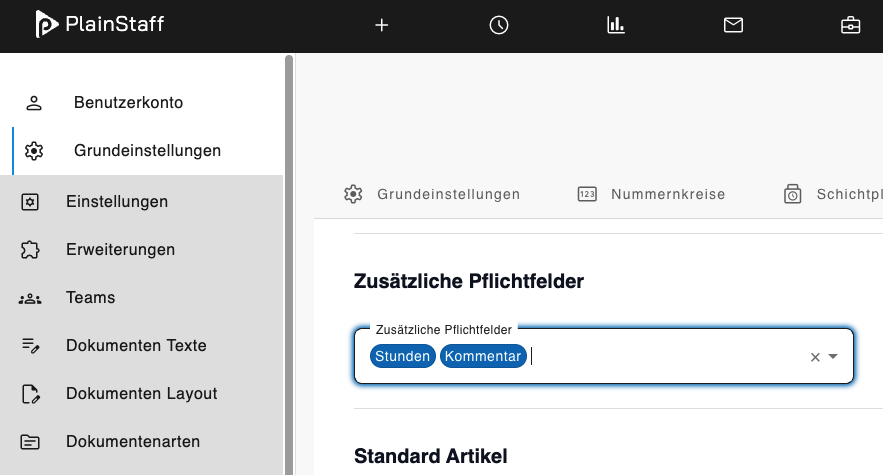
  • New Project Settings: In the project settings, you can now make the number of hours and the comment mandatory fields for project time entries. This can also be applied to all projects in the basic settings.
New setting for mandatory fields in project entries
Bug Fixes

We have fixed various bugs in the background to ensure everything runs smoothly. Here is an overview of the most important corrections:

  • Display issue when switching from hourly to time tracking resolved.
  • Missing calendar filter in the employee view added.
  • Sort function in the document list now works reliably.
  • Vacation calculation for employees without an assigned time model corrected.
  • Problem with empty project booking reports during multiple selection fixed.

We hope that these new features make your daily work easier! If you have any questions or would like to give feedback, please feel free to contact us at [email protected].

Best regards,

Your PlainStaff Team