
DATEV Time Tracking: Export Working Hours for Payroll
About DATEV payroll
With DATEV payroll you produce the monthly wage and salary accounting for your employees – legally sound and always in line with current legislation. What DATEV needs for that is clean working hours and absences. That is exactly what PlainStaff delivers: at the end of the month you generate a file containing all payroll-relevant time entries, which is read into LODAS or Lohn und Gehalt. Retyping timesheets is no longer necessary.
- Working hours and absences are recorded once and handed over once
- You control wage types and absence codes directly on the booking types
- One export per month – traceable and repeatable as often as you like
- The way you work with your tax advisor stays exactly the same

DATEV screenshot
Setting up the DATEV export
Setup takes a few minutes and only has to be done once:
- In PlainStaff, go to Administration > Integrations and open the settings on the DATEV card.
- Enter your DATEV consultant number.
- Enter your DATEV client number.
- On every booking type that is to be included in payroll, store the matching wage type – for absence periods, add the absence code as well. The help article on booking types explains how.
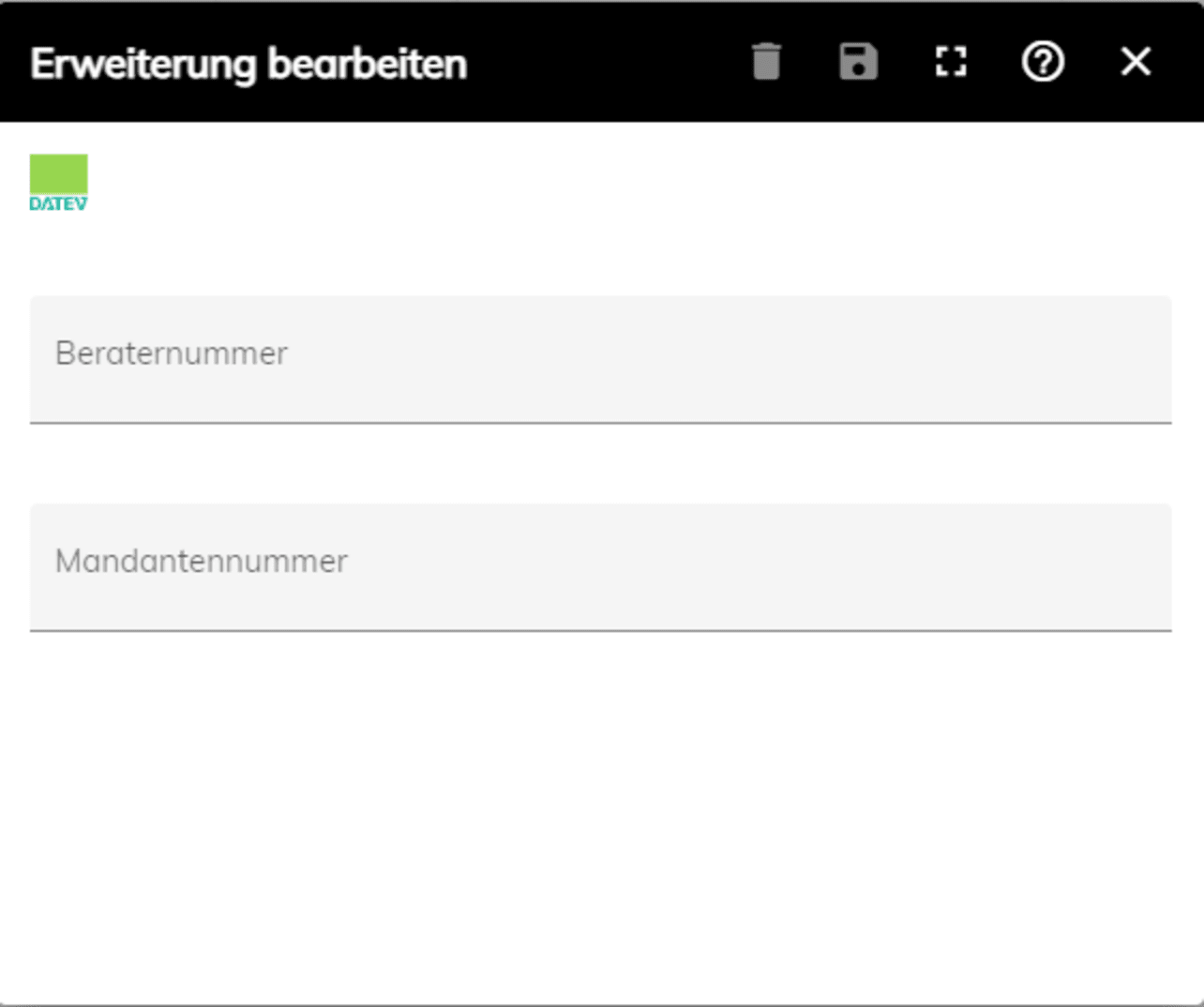
DATEV connection
Export monthly and import into DATEV
Once everything is set up, your month-end close consists of two steps:
- In the employee overview you select the payroll month and export the recorded working hours and absences as a DATEV-compatible text file (*.txt). The export is available to administrators.
- The file is imported into the calendar entry of DATEV payroll – by you or by your tax advisor. The help article on the DATEV export describes the procedure step by step.
- Only time entries from booking types with a stored wage type or absence code go into the export. That keeps purely internal time categories out of payroll.
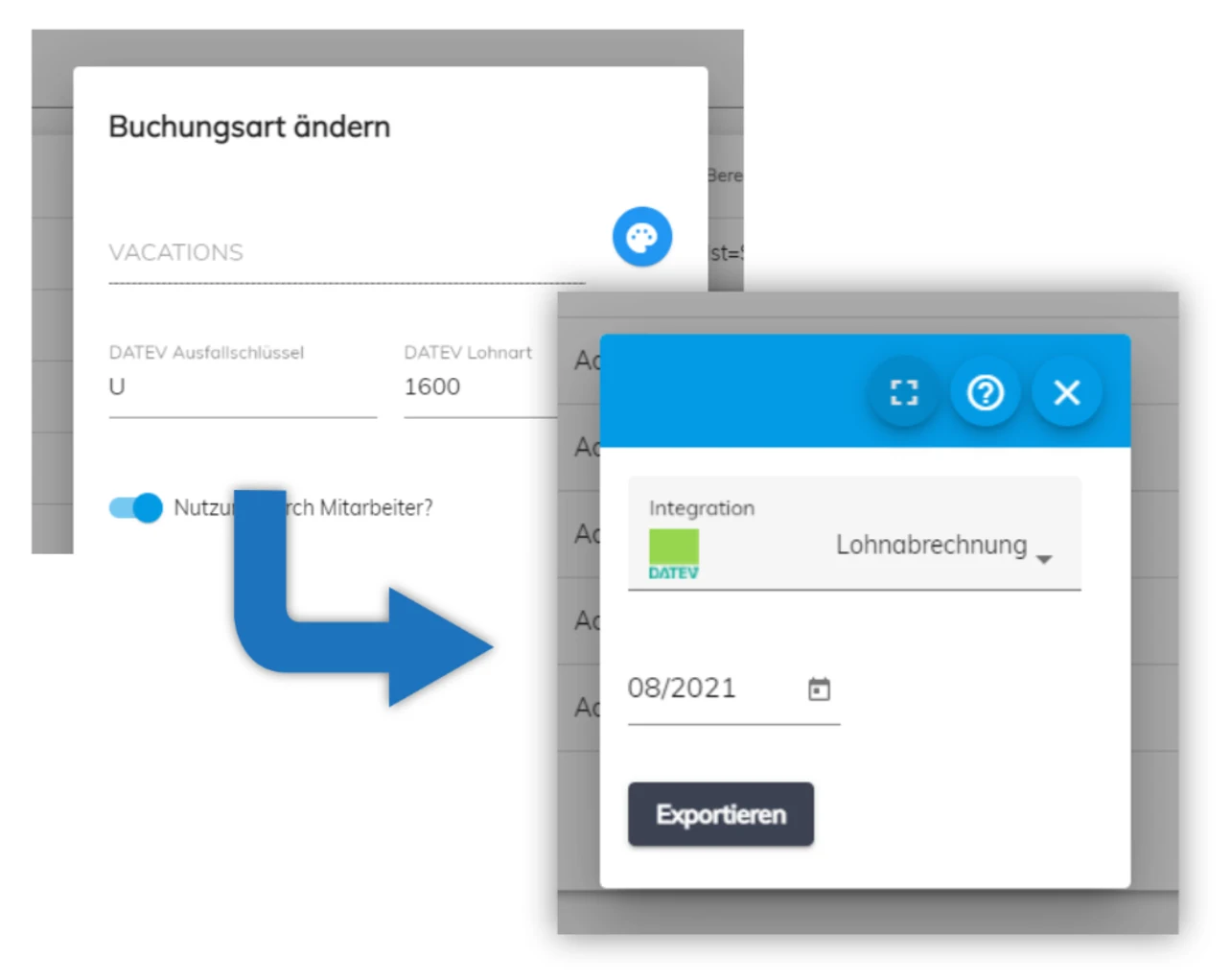
DATEV usage
How the handover to DATEV works
The link between PlainStaff and DATEV is a file export: for each payroll month you generate a text file that is imported into the calendar entry of LODAS or Lohn und Gehalt. There is no permanent online coupling, no transfer in the background and no sign-in via DATEV SmartLogin.
This means PlainStaff is not a certified data service from the DATEV marketplace – neither a payroll import data service (LIDS) nor a payroll report data service (LADS). We say so upfront so that you can judge the integration correctly before you set it up.
When the file export is the right choice
For companies whose payroll runs once a month at their tax advisor, the file route is the shortest one: export, hand over, read in. The state of the data is unambiguously fixed at the moment of the export, every file can be reproduced, and no additional contracts or activations in the DATEV marketplace are required.
A certified data service is the better choice if your payroll office explicitly insists on one, if hours and premiums are meant to flow continuously rather than monthly, or if your process has to supply several clients fully automatically. In that case you are better served by a LIDS provider – that, too, is part of an honest assessment.
GoBD audit log, Z3 export and archiving
Independently of the payroll handover, the Gold plan has PlainStaff log every change in line with GoBD, provide auditors with an IDEA-compliant Z3 export and archive the data for ten years. Which features are included in which plan is shown in the plan overview; hosting and data protection are described under Is my data secure?.
One point of clarification: the DATEV export serves payroll. The obligation to record working hours under the German Occupational Health and Safety Act (Arbeitsschutzgesetz) is something you meet through the ongoing recording in PlainStaff itself.
What belongs alongside the payroll handover
DATEV covers payroll. Everything that hangs off it in day-to-day business stays in PlainStaff: recording and evaluating project hours, turning them into invoices, plus handovers to Lexware Office – you will find our partner profile on lexware.de – and to Dynamics 365 Business Central via Microsoft AppSource.
Frequently asked questions about DATEV time tracking
How does the DATEV export from PlainStaff work?
PlainStaff generates a text file containing all working hours and absences for the selected month. That file is then imported into the calendar entry of DATEV payroll – either by you or by your tax advisor.
Which DATEV programs are supported?
DATEV LODAS and DATEV Lohn und Gehalt. Both programs read the same export file via the calendar entry.
What data does the export file contain?
For each employee, the working hours and absences of the selected month, each with the wage type or absence code stored on the booking type. The consultant number and client number configured in PlainStaff are included as well.
How do I set up wage types and absence codes?
On the booking types in PlainStaff. Which codes you use is something you agree with your tax advisor. Only booking types with a wage type or an absence code end up in the export – details are in the help article on booking types.
Is this the DATEV payroll import data service (LIDS)?
No. The handover is a file, not a certified data service from the DATEV marketplace. If your payroll office requires a data service such as LIDS or LADS, a correspondingly certified provider is the better fit.
What about DATEV LODAS time tracking?
The route is the same: export the text file from PlainStaff and import it into the calendar entry of LODAS.
How secure is the handover of the data to DATEV?
The export runs over an encrypted connection and ends up as a file with you. There is no automatic transmission to DATEV and no third-party interface in between – you decide when the file goes out and to whom.
Can I try the export beforehand?
Yes. The DATEV export is fully available during the free trial, so you can run through a complete month-end close before you decide. The help article on the DATEV export describes the procedure.
You might also be interested in
Employee Time Tracking
Record working hours effortlessly and in line with the GDPR.
Project Time Tracking
Record hours per project and evaluate budgets.
Lexware Office integration
Hand over hours and receipts to Lexware Office.
Dynamics 365 Business Central
Hours and projects in the ERP – via Microsoft AppSource.
Help on the DATEV export
Step by step to the text file and the calendar import.